

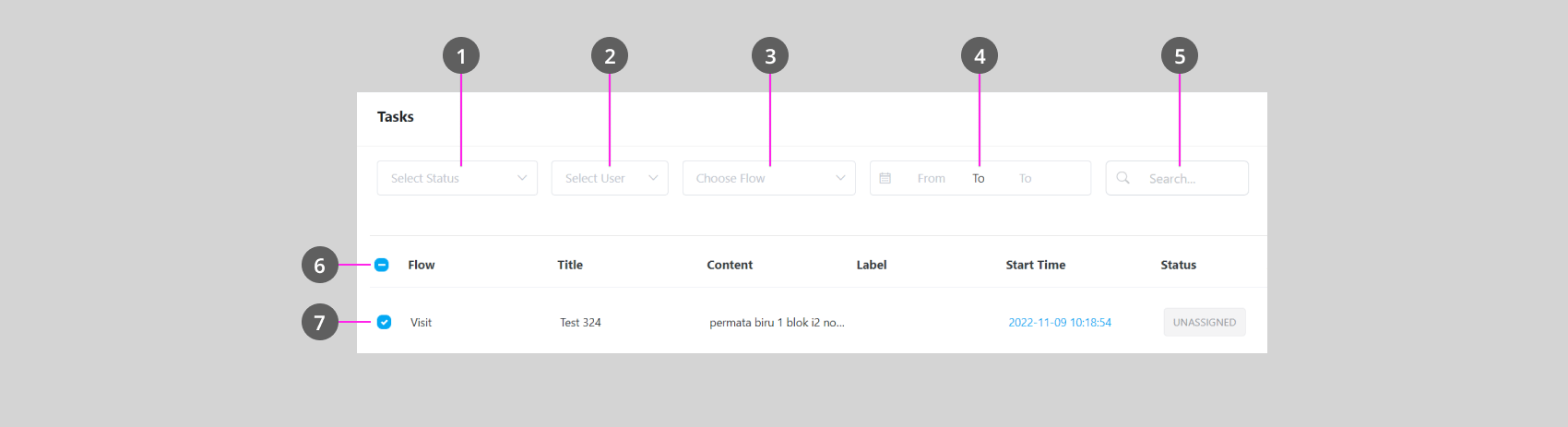
- Use this filter and export task reports of one or multiple statuses
- Use this filter and export task reports of the specific assignee
- Use this filter and export task reports that use specific Flow
- Use this filter and export task reports from the specific date range
- Use this filter and export task reports that contain a specific keyword
- Use this checkbox, and export the task report of all task that is visible on the Task list. If you wish to export all Tasks, click Load All, check this box, and export.
- Use this toggle, and export the task report of one or multiple tasks, if you do this, the only task that is checked will be included in the report.
Default time range. If you export without setting the date range filter (point 4), the report only includes tasks from the last 30 days, counted from the moment you click Export.To export a different period, set the date range filter first. A single export can cover a maximum range of 31 days.This does not apply when you export selected tasks (point 7) — only the tasks you checked are included, regardless of their date.