

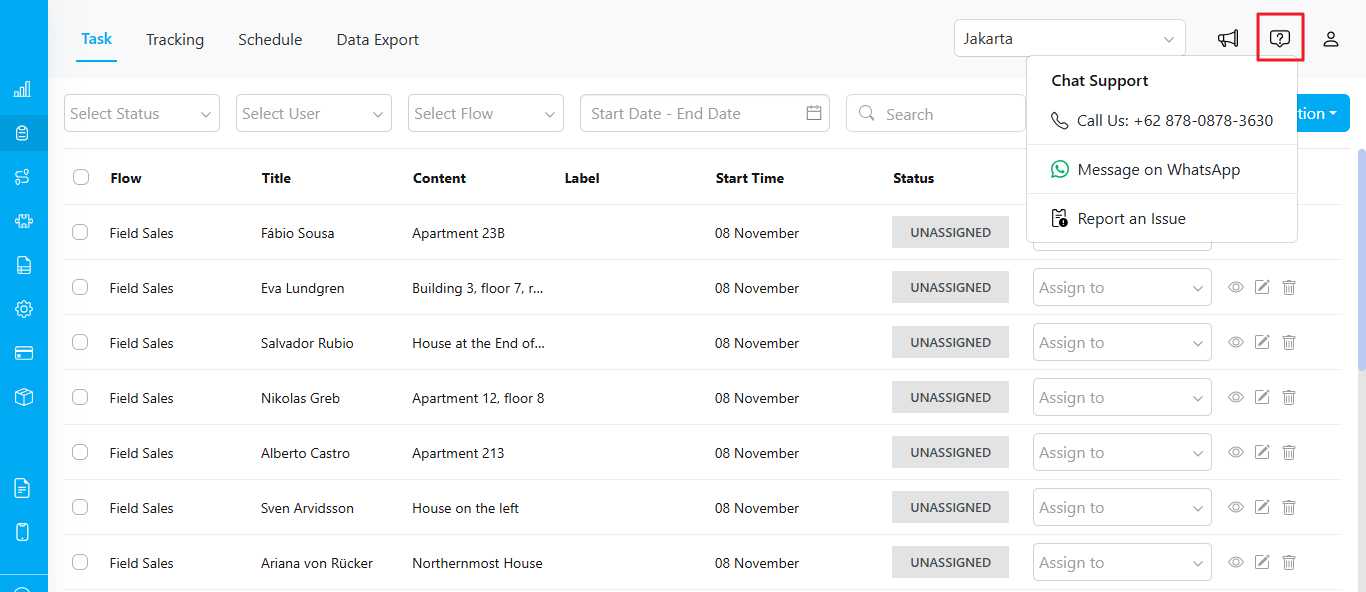
How to Access Chat Support
-
Location: The Chat Support icon is located at the top-right corner of the web page, next to the notification and user profile icons.
- The icon appears as a speech bubble with a question mark (see the red-highlighted area in the image above).
-
Chat Support Options:
- When you click the Chat Support icon, a dropdown menu will appear with three options:
- Call Support: Clicking this will allow you to call the support team directly at +62 878-0878-3630.
- Message on WhatsApp: Selecting this option will redirect you to WhatsApp, where you can send a message to the support team.
- Report an Issue: Clicking this will open a new tab to a Freshdesk ticket. You can register or sign in to create a ticket.
- When you click the Chat Support icon, a dropdown menu will appear with three options:
-
Additional Support Contact:
- If you prefer to contact support via email, you can reach us at support@mile.app.