

Overview
The Create Task automation type automatically creates a new task in a specified Flow when an automation event is triggered. This enables automated workflow chains where one task triggers the creation of follow-up tasks, streamlining multi-step processes.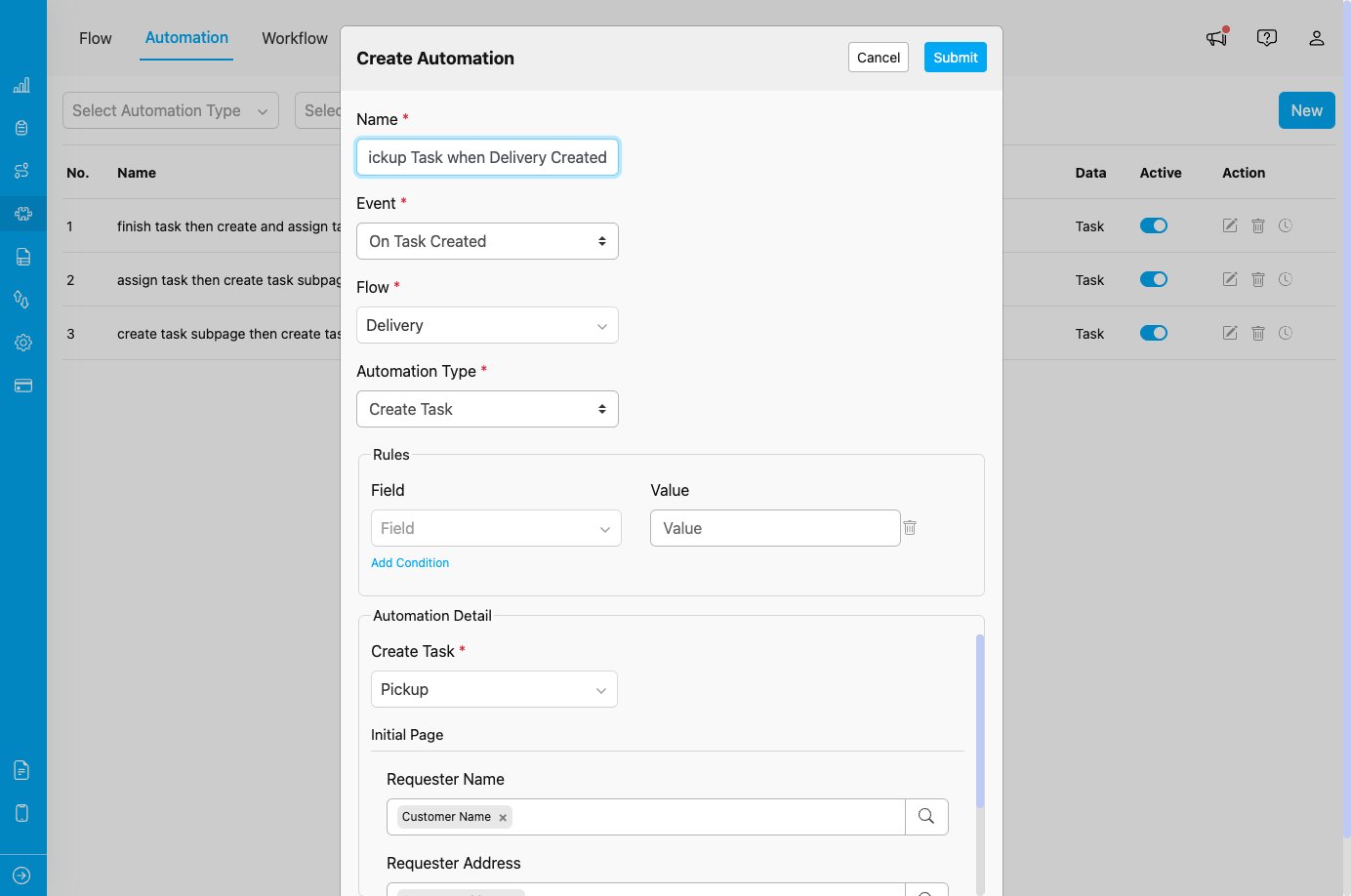
Create Task automation configuration showing Flow selection and field mapping
When to Use Create Task
Use this automation type when you need to:- Automatically create follow-up tasks in a workflow sequence
- Generate inspection or quality check tasks after service completion
- Create documentation or reporting tasks after task completion
- Trigger dependent tasks in multi-stage processes
- Automate task creation based on external data source changes
Event Availability
Create Task automation type is available for:- On Task Created - Create a new task when another task is created
- On Task Assigned - Create a new task when a task is assigned
- On Task Finished - Create a new task when a task is completed
- On Data Source Created - Create a new task when new data is added to a Data Source
Configuration Fields
When you select Create Task as the automation type, you need to configure the following:1. Create Task *
Select the Flow for the new task that will be created. Purpose:- Defines which type of task will be automatically created
- Determines what fields need to be mapped
- Choose from any Flow configured in your organization
- Once selected, the Flow’s fields will appear for mapping
2. Field Mapping (Automation Detail)
After selecting the Flow, you’ll see all the fields from that Flow. For each field, you can: Option A: Manual Input- Type a static value directly into the field
- Useful for default values that don’t change
- Click the search icon next to the field
- Select a field from the trigger Flow to map its value
- The value from the trigger task will be copied to the new task
- Fields can be left empty if they are optional
- Required fields must be filled either manually or via reference
- Text Input - Type static values or use field references
- Component Reference - Map components from trigger Flow to new task Flow
- Mixed Approach - Combine static values and field references as needed
Use Cases
1. Delivery and Pickup Workflow
Scenario: Automatically create a pickup task when a delivery task is created. Configuration:- Event: On Task Created
- Flow (Trigger): Delivery
- Automation Type: Create Task
- Create Task Flow: Pickup
- Field Mapping:
- Requester Name → Customer Name (from Delivery)
- Requester Address → Customer Address (from Delivery)
- Pickup Point Coordinate → Customer Coordinate (from Delivery)
2. Quality Inspection After Service
Scenario: Create an inspection task when a service task is completed. Configuration:- Event: On Task Finished
- Flow (Trigger): Home Cleaning
- Automation Type: Create Task
- Create Task Flow: Quality Inspection
- Field Mapping:
- Customer Name → Customer Name (from Home Cleaning)
- Service Address → Service Location (from Home Cleaning)
- Service Date → Completion Date (from Home Cleaning)
3. Follow-up Tasks from Field Canvassing
Scenario: Create follow-up sales tasks when canvassing identifies opportunities. Configuration:- Event: On Task Finished
- Flow (Trigger): Field Canvassing
- Automation Type: Create Task
- Create Task Flow: Field Sales
- Field Mapping:
- Prospect Name → Canvassed Name (from Field Canvassing)
- Prospect Contact → Contact Number (from Field Canvassing)
- Interest Level → Survey Result (from Field Canvassing)
4. Documentation Task from Data Source
Scenario: Create documentation tasks when new data is added to a Data Source. Configuration:- Event: On Data Source Created
- Flow (Trigger): Customer Database
- Automation Type: Create Task
- Create Task Flow: Customer Documentation
- Field Mapping:
- Customer Name → Name (from Data Source)
- Customer ID → ID (from Data Source)
- Registration Date → Created Date (from Data Source)
How It Works
- Event Occurs: The specified event is triggered (task created, assigned, finished, or data source created)
- Rules Evaluated: If Rules are configured, they are checked against the triggering data
- Automation Triggers: The Create Task automation is activated
- Task Created: A new task is created in the specified Flow
- Fields Populated: Fields are filled with mapped values (references or static text)
- Task Available: The new task appears in the task list and is ready for assignment
Field Mapping Best Practices
Understanding Field Types
When mapping fields from the trigger Flow to the new task Flow: Direct Mapping:- Map fields with similar data types (text to text, coordinate to coordinate)
- Example: Customer Name → Requester Name
- You can map any field from trigger to any field in new task
- Example: Order Number → Invoice Reference
- Use for fields that should always have the same value
- Example: Priority → “High” (always set to High)
- Required fields (marked with *) must be filled
- Optional fields can be left empty
Field Mapping Strategies
- Complete Mapping: Map all relevant fields for full context transfer
- Partial Mapping: Map only essential fields, leave others for manual input
- Hybrid Approach: Map some fields automatically, add static defaults for others
Important Notes
Task Creation Behavior
- Immediate Creation: New tasks are created as soon as automation triggers
- No Assignment: Created tasks are unassigned by default (use Create and Assign Task if assignment is needed)
- Hub Inheritance: New tasks are created in the same hub as the trigger task (for task events)
- Independent Tasks: Created tasks are separate entities, not linked to trigger task
Rules and Filtering
- Use Rules to Control When Tasks Are Created: Add conditions to create tasks only when specific criteria are met
- Example: Only create inspection tasks when service rating is below 4 stars
- Multiple Automations: Create different automation rules for different scenarios
Performance Considerations
- Avoid Circular References: Don’t create automation loops (Task A creates Task B, Task B creates Task A)
- Use Rules Wisely: Too many automations without Rules can create excessive tasks
- Monitor Task Volume: Review automation logs to ensure tasks are created as intended
Best Practices
- Clear Flow Selection: Choose the appropriate Flow that represents the next step in your workflow.
- Meaningful Field Mapping: Map fields that provide context and reduce manual data entry.
- Use Field References: Prefer field references over manual input to ensure data consistency.
- Test Thoroughly: Create test tasks to verify field mapping works correctly.
- Document Automation Purpose: Use clear automation names that describe the workflow (e.g., “Create Pickup Task when Delivery Created”).
- Leverage Rules: Combine with Rules to create tasks only when specific conditions are met.
- Monitor and Adjust: Regularly review created tasks to ensure automation is working as expected.
- Consider Assignment Needs: If tasks need immediate assignment, use Create and Assign Task instead.
Troubleshooting
Issue: New task is not being created when event triggers Possible Causes:- Automation is not set to Active
- Event Flow does not match automation configuration
- Rules exclude the triggering task/data
- Required fields in new task Flow are not mapped
- Verify automation toggle is ON
- Check Event and Flow settings match trigger
- Review Rules for conflicts
- Ensure all required fields have values (mapped or static)
- Field reference is mapped to an empty field in trigger
- Incorrect field mapping
- Field types don’t match
- Verify trigger task has values in referenced fields
- Check field mapping configuration
- Re-map fields if necessary
- No Rules configured to filter when tasks should be created
- Multiple overlapping automation rules
- Add Rules to create tasks only when needed
- Review all active automations for the same event
- Consolidate or refine automation rules
- Incorrect Flow selected in “Create Task” field
- Multiple automations with different Flows
- Edit automation and verify correct Flow is selected
- Review all automations for the same event
Related Documentation
- Automation Events - On Task Created
- Automation Events - On Task Assigned
- Automation Events - On Task Finished
- Automation Events - On Data Source Created
- Create and Assign Task