

Setting Up Webhooks On Routing Dispatched
1. Introduction
When you dispatch routing results, you may need to make adjustments such as moving visits to different vehicles or changing assignees. This event ensures that you receive updated routing result data at your specified URL. This automation triggers each time you hit the Dispatch button in the Routing/Result menu.2. Prerequisites
Before proceeding, ensure that you have the following:- Access to your user account on MileApp.
- A valid URL where you want to receive the webhook payload.
3. Setting Up a Webhook
3.2 Creating a New Automation
- In the Automation settings, locate the “New” button and click on it.
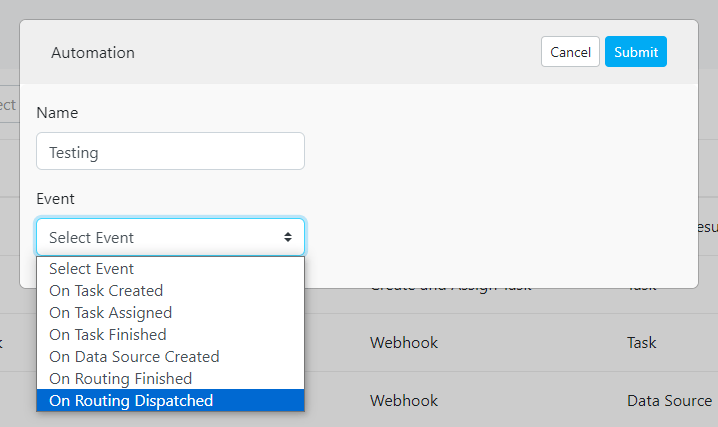
- This will open a new automation configuration page. Fill in the following details:
- Automation Name: Provide a descriptive name for your automation to easily identify it later.
- Event: Select the “On Routing Dispatched” event to trigger the automation when you dispatch the routing result.
- Automation Type: Choose “Webhook” as the automation type to enable webhook integration.
- URL: Enter the URL where you want to receive the webhook payload.
- Header (Optional): If required, specify any additional headers to be included in the webhook request.
- Value (Optional): Provide corresponding values for the headers if applicable.
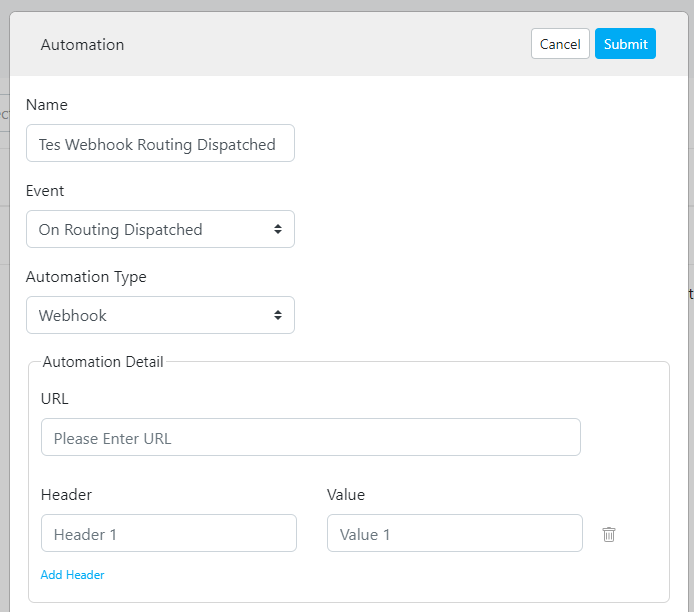
- Once you have completed the automation configuration, click Submit to create the new automation. Upon activation, the automation will send the payload to the specified URL every time the route optimization dispatch process is completed.