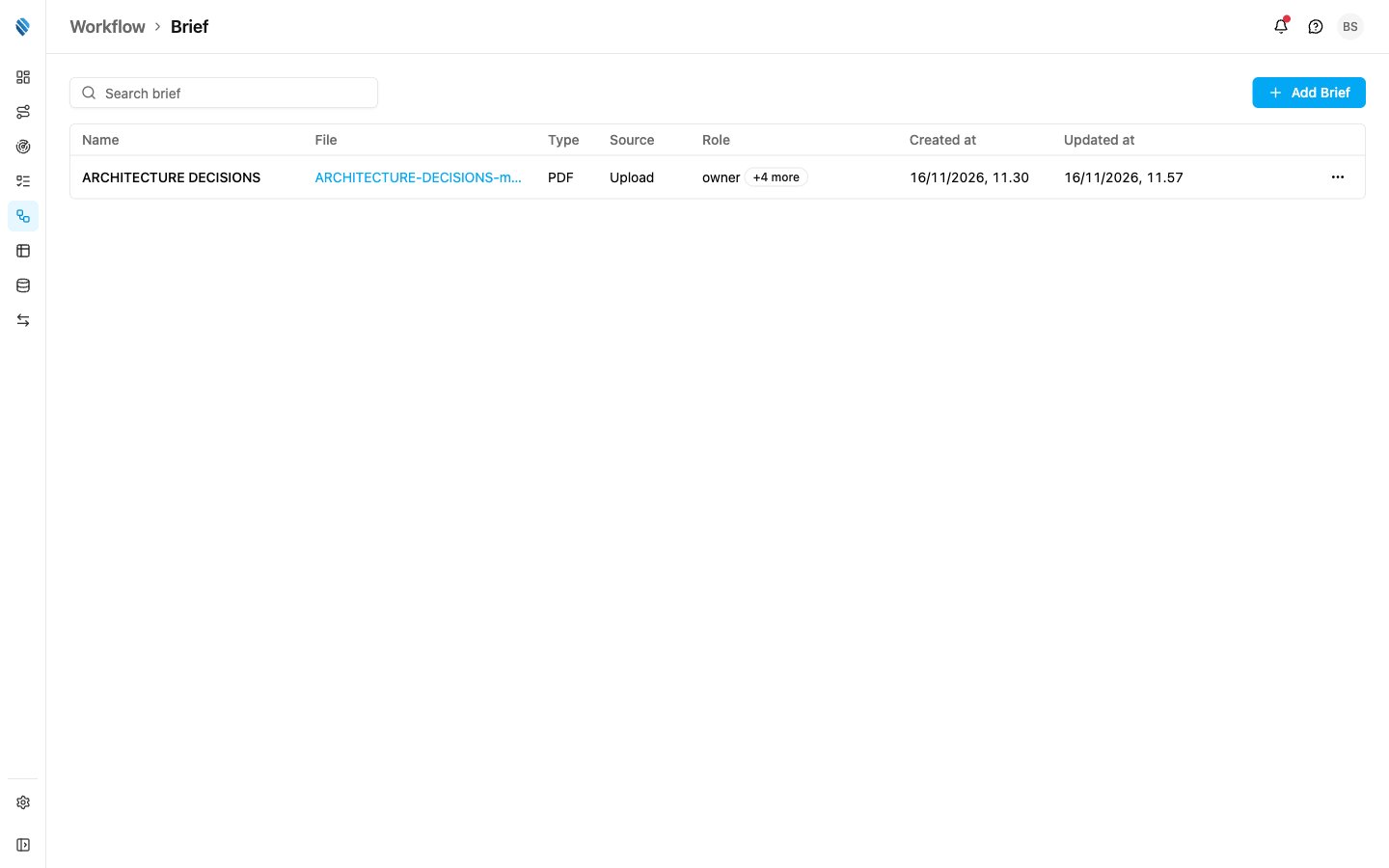
A brief is a reference document your field team reads while they work, such as an SOP, a product guide or a campaign brief. Each brief is one PDF, either from a link or uploaded to MileApp, and you choose which roles can see it. Field users open their briefs in the mobile app. Each user sees only the briefs shared with their role, plus the briefs shared with every role. Open Workflow › Brief.
Required permission:
  • View brief
  • Create brief
  • Edit brief
  • Delete brief

Who sees which brief

When you add a brief you pick its Roles:
  • Roles left empty: every role sees the brief.
  • One or more roles: only users with one of those roles see it.
Only the owner sees every brief. Every other role, admins included, sees the briefs for its own role and those for every role, on the web and in the mobile app alike. A brief limited to other roles cannot be opened, edited or deleted by them.

The Brief list

Brief list
  1. Search brief
Finds briefs by name.
  1. Add Brief
Adds a brief. See Managing Briefs.
  1. Brief row
Click a row to open the brief’s PDF in a new tab.
  1. Row menu (⋯)
Edit or Delete the brief.

Columns

The list shows 20 briefs per page, newest change first. When there are none yet, the page shows No briefs yet.
Briefs are shared by the whole organization, so the hub picker in the header does not filter this page.

Next steps