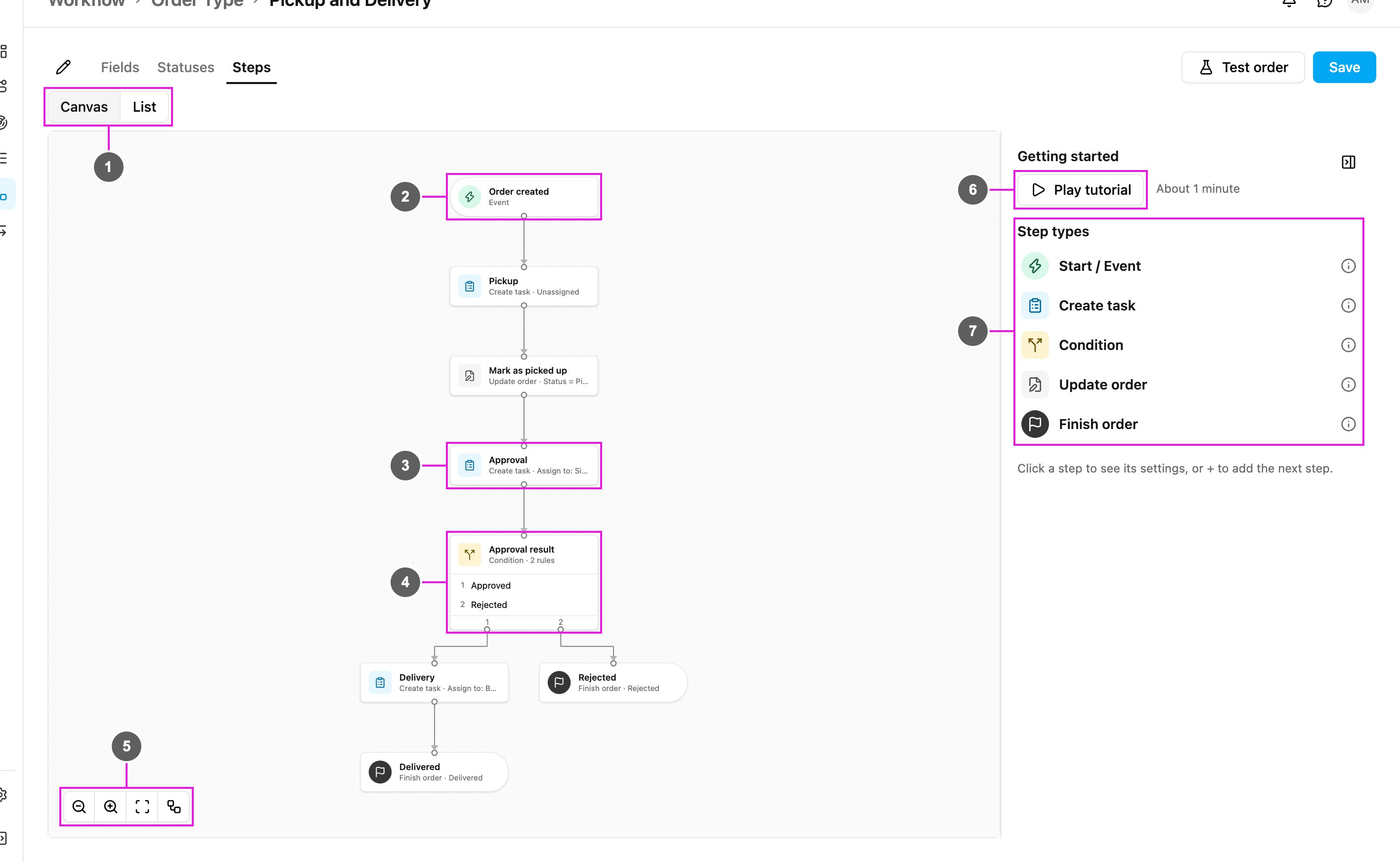
The order type editor: fields, statuses, steps and every step type, assigning tasks, and saving.
Open an order type from Workflow › Order Type to edit it. The editor has three tabs, Fields, Statuses and Steps, and one Save button that makes your changes live.
Required permission:
View Order Type
Edit Order Type
Without Edit Order Type the editor opens read-only and says You can view this Order Type but not change it.
The editor
Rename
Changes the order type’s name. See Rename an order type. The name itself is shown once, in the breadcrumb at the top.
Tabs
Fields, Statuses and Steps. After a save that found problems, a tab shows how many problems it holds, for example 2 problems.
Test order
Runs the order type on sample values without saving anything. See Test an order type.
Save
Saves your changes and, when nothing blocks it, makes them live for new orders. See Save and go live.
Add field
Adds a field to the order type.
Field row
One field per row, described below.
Fields
Fields are the data every order carries: customer, address, items. Each row has:
Setting
What it does
Title
The field’s name as people see it on the order form and the order page.
Type
What kind of value the field holds (see below).
Required
The order cannot be created without a value.
Show on table
Shows the field as a column in the order list.
Unique
No two orders of this order type may hold the same value. Not every type can be unique.
Delete (bin icon)
Removes the field. A field that orders already use is archived instead, and can be restored.
Drag a row by its handle to change the order of the fields.Field types:
Type
Holds
Text
Free text.
Number
A number.
Option
One of a list of options you type in.
Date, Date & time, Time
A date, a date and time, or a time of day.
Phone number
A phone number.
Coordinate
A map location.
Reference to data
A record from a data source.
List (line items)
Rows of items, with their own columns, for example item, quantity.
User
A user of your organization.
Yes / No
A yes or no answer.
Once orders hold a value for a field, its type can no longer be changed and it cannot be removed, only archived. The row says how many orders have a value.
Statuses
Add status
Adds a status.
Label
The status name people see, for example Picked up.
Category
Every status belongs to one category:
New: where every order starts. Add exactly one status in this category.
In progress: the order is being worked on.
Completed: the order is finished. These are marked Final; add at least one. A Finish order step can only end an order in a Completed status.
Drag a row to change the order of the statuses, or use the bin icon to remove one. A status that orders are currently in cannot change category or be removed.
Steps
The Steps tab is where you decide what happens to an order. It opens as a canvas, with a guide panel on the right.
Canvas / List
Switches between the canvas and a list of the steps.
Trigger
The first step: what starts the order.
Step card
Each card shows the step’s name and, below it, its type and the most important setting, for example Create task · Assign to: Siti Rahma (Supervisor).
Condition card
A Condition lists its rules. Each rule is its own exit, with its own path below it.
Canvas controls
Zoom out, Zoom in, Fit to screen and Auto-layout, which rearranges the steps neatly from top to bottom.
A short description of each step type. Hover the info icon of a type for more.The canvas is meant for a desktop or tablet. On a narrow screen it says Use a wider screen to drag and connect.
List view
List shows the same steps as a table, which is easier to scan on a large order type.
Step row
Each row shows the step’s Type, its Name, its Problems and where it Goes to. A Condition lists each rule with its next step, for example Approved: Delivery.
Add the first step
A new order type has an empty canvas with an Add first step tile.
Add first step
Opens Choose a trigger.
Order created
Starts when an order is created: from the order form, the API, an import, or a Task finished trigger of another order type. An order that is updated through its duplicate key does not start again.
Status becomes…
Starts when the order reaches the status you choose. It runs once per order, the first time the order reaches that status.
Task finished
Creates an order when a task of the chosen flow is done. See Task finished.An order type has one trigger.
Add the next step
Every card has a + under it. Click it to open What happens next?
Search steps
Filters the list by name.
Actions
Adds a new step: Create task, Condition, Update order or Finish order.
Connect to an existing step
Draws a line to a step that already exists instead, so two paths can join. Steps that cannot be used are greyed out and say why: Would loop or Already connected.On a desktop you can also drag from a card’s handle to another card to connect them. To remove a line, select it and click its Delete line button, or press Delete.
Read and edit a step
Click a card to open its summary in the side panel.
Settings
The step’s settings, read-only. Not set means a setting is still empty.
Next
Where the order goes after this step, and Add parallel step to start a second path from the same exit. For a Create task step the exit is When the task is done.
Comes from
The steps that lead here. Click one to jump to it.
Delete
Deletes the step. If other steps can then no longer be reached, the app names them and asks you to confirm with Delete only this.
Edit
Switches the panel to editing. Change the settings, then click Done.The step name at the top of the panel can be changed while editing. When no step is selected, the panel shows the guide: Getting started and the Step types.
Step types
Order created and Status becomes
Add next step
Adds the step that follows the trigger.
Connect to…
Connects the trigger to a step that already exists.Order created has no other settings. Status becomes… asks for the status: When the status becomes.
Task finished
A Task finished trigger creates orders from finished tasks, for example one order per finished Pickup task. Its settings:
Flow: which flow’s tasks start an order.
Only if (optional): conditions on the task’s answers. If they do not match, no order is created.
Task answers → order fields: which task answer fills each order field. A required order field with no value is reported as a problem.
How many orders: One per task, or One per row of a list in the task, so a task with five rows creates five orders.
Tasks created by an order never start a new order. Later steps can read the triggering task’s answers.
Create task
Creates a task and waits until it is done.
Flow
The flow the task is made from.
Assign to
Unassigned: the task is created without an assignee, to be assigned later.
A user: first choose a Role, then pick a user who holds that role. The card then reads Assign to: Siti Rahma (Supervisor).
How many tasks
One per order, or One per row of a list field of the order, so an order with three line items gets three tasks.
Task data
Fills fields of the new task, each from an order field, an earlier answer or a fixed value.
Save answers to the order
Copies answers from the finished task into order fields. Optional: a Condition can read answers without saving them.
Delete
Deletes the step.
Done
Leaves editing and shows the summary again.The task is created in the order’s hub. The order moves on when every task this step created is settled.
Condition
Sends the order down the path whose rule matches.
Rule name
The name of the rule, which is also the name of its exit on the card, for example Approved.
Value to check
An order field, an earlier task answer, or the attempt count of a Create task step.
Operator and value to compare
The operator (equals, does not equal, greater than, at least, less than, at most, contains, is empty) and what to compare with: a Fixed value or another field or answer. For a list, choose whether All rows or Any row must match.
Add condition (AND)
Adds another condition to the same rule. All of them must match.
Goes to
The step this rule’s path leads to, with Add next step and Connect to….Add more rules with Add rule, and use a rule’s ⋯ menu to move it up or down or delete it. Every rule that matches runs. If none matches, the order stops and needs attention, so cover every case, for example with both Approved and Rejected.
Update order
Sets order fields or the status.
Set fields
Add field sets an order field from an earlier answer, another field or a fixed value.
Set status
Don’t change: keeps the status.
Fixed status: always sets the chosen status.
From a choice answer: picks the status from an earlier choice answer, using an Answer → status table. An answer not in the table leaves the status unchanged.
Set at least one field or a status. Update order cannot set a Completed status; use Finish order for that.
Finish order
Sets the final status and ends the order.
Final status
A status in the Completed category.When a Finish order runs, other paths that are still running stop. A Finish order has no next step.
Problems
The editor checks the order type when you save. Problems appear on the cards, in the step panel under Problems and Warnings, and as a count on each tab. Common ones:
Add a trigger to start these steps, or An Order Type can have only one trigger.
Unreachable: no line leads here: a step no path reaches.
Dead end: every path must end at Finish order.
This line would make a loop: steps cannot go back to an earlier step.
… is required: a step setting is still empty, for example Flow is required.
No rule covers: …: a Condition leaves some choice answers without a path.
Add exactly one status in the category New and Add at least one status in the category Completed.
Save and go live
There is one Save. It saves your changes and checks the order type:
No problems: the changes go live at once and the app says Saved. New orders use it.
Only warnings: a Check these warnings dialog lists them. Click Save anyway to go live, or go back and fix them.
Problems: a Fix these to go live dialog lists them. Your changes are saved as a draft. They go live once these are fixed. The list shows the order type as Published · draft changes (or Draft if it was never live) until you fix them and save again.
Orders already running keep the version they started with; new orders use the latest live version.If someone else saved the same order type while you were editing, the app says This draft changed while you were editing and offers Reload to see their changes or Overwrite to keep yours. Leaving the editor with unsaved changes asks you to Discard changes or Keep editing.
{"docsConfig":{"theme":"mint","$schema":"https://mintlify.com/docs.json","name":"Docs","colors":{"primary":"#02A8F3","light":"#02A8F3","dark":"#028FCF"},"logo":{"light":"https://mintcdn.com/mileapp-e5b5ea5a/YqNBkdQwu9Fr_pJf/logo/light.svg?fit=max\u0026auto=format\u0026n=YqNBkdQwu9Fr_pJf\u0026q=85\u0026s=5b55fe90918fe2228b5d14350795a782","dark":"https://mintcdn.com/mileapp-e5b5ea5a/YqNBkdQwu9Fr_pJf/logo/dark.svg?fit=max\u0026auto=format\u0026n=YqNBkdQwu9Fr_pJf\u0026q=85\u0026s=8d3fdbfd41d8d9a81635fb18c57c3fda"},"favicon":"https://mintcdn.com/mileapp-e5b5ea5a/A0gJBfYXXn39zWht/favicon.ico?fit=max\u0026auto=format\u0026n=A0gJBfYXXn39zWht\u0026q=85\u0026s=26aa98e3672a063064419253d6a2a3a4","api":{"playground":{"display":"interactive"},"mdx":{"auth":{"method":"bearer"}}},"navbar":{"links":[{"href":"https://paket.freshdesk.com/support/home","label":"Support"}]},"search":{},"seo":{"metatags":{"robots":"noindex, nofollow"}},"styling":{"latex":false},"navigation":{"pages":[]}},"deployment":{"deploymentMetadataValue":{"subdomain":"mileapp-e5b5ea5a","hasAudioNarration":false,"actualSubdomain":"mileapp-e5b5ea5a","customDomains":["docs.mile.app"],"gitSource":{"type":"gitlab","owner":"paketid","repo":"mileapp-docs","projectId":76553900,"deployBranch":"master","contentDirectory":"","isPrivate":true,"mountPath":"","label":""},"entitlements":{},"buildId":"6afd13524e4093e704e11eca","clientVersion":"0.0.4270","searchFilterCounts":[{"language":"default","tag":"API Reference","count":385},{"language":"default","tag":"Guides","count":206},{"language":"default","tag":"Workflow","count":150},{"language":"default","tag":"Settings","count":118},{"language":"default","tag":"Planning","count":106},{"language":"default","tag":"Routing","count":97},{"language":"default","tag":"Activities","count":75},{"language":"default","tag":"Task","count":75},{"language":"default","tag":"Flow","count":50},{"language":"default","tag":"Analytics","count":45}]},"assistantConfig":{"enableAskAiButton":false,"enableStarterQuestions":false,"enableAskAiSearchBar":true},"basePath":"","hasChatPermissions":false,"hasWebMcpPermissions":false,"toggles":[{"name":"kill-isr","enabled":true,"variant":{"name":"disabled","enabled":false,"feature_enabled":true},"impressionData":false},{"name":"custom-rbac-roles","enabled":true,"variant":{"name":"disabled","enabled":false,"feature_enabled":true},"impressionData":false},{"name":"agent-mintlify-slack","enabled":true,"variant":{"name":"disabled","enabled":false,"feature_enabled":true},"impressionData":false},{"name":"agent-integrations-settings","enabled":true,"variant":{"name":"disabled","enabled":false,"feature_enabled":true},"impressionData":false},{"name":"rbac-expansion","enabled":true,"variant":{"name":"disabled","enabled":false,"feature_enabled":true},"impressionData":false},{"name":"automations-pr-grouping","enabled":true,"variant":{"name":"disabled","enabled":false,"feature_enabled":true},"impressionData":false},{"name":"custom-prefix","enabled":true,"variant":{"name":"disabled","enabled":false,"feature_enabled":true},"impressionData":false},{"name":"analytics-v7","enabled":true,"variant":{"name":"disabled","enabled":false,"feature_enabled":true},"impressionData":false},{"name":"user-flows-analytics","enabled":true,"variant":{"name":"disabled","enabled":false,"feature_enabled":true},"impressionData":false},{"name":"no-publish-flow","enabled":true,"variant":{"name":"disabled","enabled":false,"feature_enabled":true},"impressionData":false},{"name":"workos-onboarding","enabled":true,"variant":{"name":"disabled","enabled":false,"feature_enabled":true},"impressionData":false},{"name":"snapshot-serving-live","enabled":true,"variant":{"name":"disabled","enabled":false,"feature_enabled":true},"impressionData":false},{"name":"stripTemperatureMiddleware","enabled":true,"variant":{"name":"disabled","enabled":false,"feature_enabled":true},"impressionData":false},{"name":"support-platform-pylon-zendesk","enabled":true,"variant":{"name":"disabled","enabled":false,"feature_enabled":true},"impressionData":false},{"name":"snapshot-serving","enabled":true,"variant":{"name":"disabled","enabled":false,"feature_enabled":true},"impressionData":false},{"name":"instant-rollback","enabled":true,"variant":{"name":"disabled","enabled":false,"feature_enabled":true},"impressionData":false},{"name":"granular-notifications-server","enabled":true,"variant":{"name":"disabled","enabled":false,"feature_enabled":true},"impressionData":false},{"name":"granular-notifications","enabled":true,"variant":{"name":"disabled","enabled":false,"feature_enabled":true},"impressionData":false},{"name":"automations-fable","enabled":true,"variant":{"name":"disabled","enabled":false,"feature_enabled":true},"impressionData":false},{"name":"fixed-ai-action-pricing","enabled":true,"variant":{"name":"disabled","enabled":false,"feature_enabled":true},"impressionData":false},{"name":"site-roles","enabled":true,"variant":{"name":"disabled","enabled":false,"feature_enabled":true},"impressionData":false},{"name":"automation-resolve-merge-conflict","enabled":true,"variant":{"name":"disabled","enabled":false,"feature_enabled":true},"impressionData":false},{"name":"scoped-publishing","enabled":true,"variant":{"name":"disabled","enabled":false,"feature_enabled":true},"impressionData":false},{"name":"mintql","enabled":true,"variant":{"name":"disabled","enabled":false,"feature_enabled":true},"impressionData":false},{"name":"page-level-analytics","enabled":true,"variant":{"name":"disabled","enabled":false,"feature_enabled":true},"impressionData":false},{"name":"editor-version-history-v2","enabled":true,"variant":{"name":"disabled","enabled":false,"feature_enabled":true},"impressionData":false},{"name":"billing-page-v2","enabled":true,"variant":{"name":"disabled","enabled":false,"feature_enabled":true},"impressionData":false},{"name":"full-page-search","enabled":true,"variant":{"name":"disabled","enabled":false,"feature_enabled":true},"impressionData":false},{"name":"workspace-projects","enabled":true,"variant":{"name":"disabled","enabled":false,"feature_enabled":true},"impressionData":false},{"name":"assistant-v5","enabled":true,"variant":{"name":"disabled","enabled":false,"feature_enabled":true},"impressionData":false},{"name":"fork-pr-previews","enabled":true,"variant":{"name":"disabled","enabled":false,"feature_enabled":true},"impressionData":false},{"name":"revalidation-jwt","enabled":true,"variant":{"name":"disabled","enabled":false,"feature_enabled":true},"impressionData":false},{"name":"workos-sso-scim","enabled":true,"variant":{"name":"disabled","enabled":false,"feature_enabled":true},"impressionData":false},{"name":"hobby-abuse-scan","enabled":true,"variant":{"name":"disabled","enabled":false,"feature_enabled":true},"impressionData":false},{"name":"dashboard-inbox","enabled":true,"variant":{"name":"disabled","enabled":false,"feature_enabled":true},"impressionData":false},{"name":"workos-signup","enabled":true,"variant":{"name":"disabled","enabled":false,"feature_enabled":true},"impressionData":false},{"name":"turbopuffer-dual-write","enabled":true,"variant":{"name":"disabled","enabled":false,"feature_enabled":true},"impressionData":false},{"name":"workos-enabled","enabled":true,"variant":{"name":"disabled","enabled":false,"feature_enabled":true},"impressionData":false},{"name":"approve-review-flow","enabled":true,"variant":{"name":"disabled","enabled":false,"feature_enabled":true},"impressionData":false},{"name":"editor-metadata","enabled":true,"variant":{"name":"disabled","enabled":false,"feature_enabled":true},"impressionData":false},{"name":"sso-setup-deadline-banner","enabled":true,"variant":{"name":"disabled","enabled":false,"feature_enabled":true},"impressionData":false},{"name":"turbopuffer-serve","enabled":true,"variant":{"name":"disabled","enabled":false,"feature_enabled":true},"impressionData":false},{"name":"live-agents","enabled":true,"variant":{"name":"disabled","enabled":false,"feature_enabled":true},"impressionData":false},{"name":"starter-pricing","enabled":true,"variant":{"name":"control","enabled":true,"payload":{"type":"string","value":"control"},"feature_enabled":true},"impressionData":false},{"name":"llms-txt-v2","enabled":true,"variant":{"name":"disabled","enabled":false,"feature_enabled":true},"impressionData":false},{"name":"wildcard-email-auth","enabled":true,"variant":{"name":"disabled","enabled":false,"feature_enabled":true},"impressionData":false}],"googleFontsInlined":false},"customCss":[{"filePath":"custom.css","content":"header>a:first-child img,nav>a:first-child img,a[href=\"/\"]>img,img[src*=\"/logo/\"]{width:150px!important;height:auto!important;max-width:150px!important}"}]}
{"page":{"pagePath":"pages/workflow/order-type/building-an-order-type","slug":"/pages/workflow/order-type/building-an-order-type","pageMetadata":{"title":"Building an Order Type","description":"The order type editor: fields, statuses, steps and every step type, assigning tasks, and saving.","href":"/pages/workflow/order-type/building-an-order-type"},"description":{"compiledSource":"\"use strict\";\nconst {jsx: _jsx} = arguments[0];\nconst {useMDXComponents: _provideComponents} = arguments[0];\nfunction _createMdxContent(props) {\n const _components = {\n p: \"p\",\n ..._provideComponents(),\n ...props.components\n };\n return _jsx(_components.p, {\n children: \"The order type editor: fields, statuses, steps and every step type, assigning tasks, and saving.\"\n });\n}\nfunction MDXContent(props = {}) {\n const {wrapper: MDXLayout} = {\n ..._provideComponents(),\n ...props.components\n };\n return MDXLayout ? _jsx(MDXLayout, {\n ...props,\n children: _jsx(_createMdxContent, {\n ...props\n })\n }) : _createMdxContent(props);\n}\nreturn {\n default: MDXContent\n};\n","frontmatter":{},"scope":{}},"pageType":"default","mdx":{"mdxSource":{"compiledSource":"\"use strict\";const{Fragment:_Fragment,jsx:_jsx,jsxs:_jsxs}=arguments[0];const{useMDXComponents:_provideComponents}=arguments[0];function _createMdxContent(props){const _components={a:`a`,em:`em`,li:`li`,ol:`ol`,p:`p`,strong:`strong`,tbody:`tbody`,td:`td`,th:`th`,thead:`thead`,tr:`tr`,ul:`ul`,..._provideComponents(),...props.components},{Heading,Note,OptimizedImage,Table}=_components;if(!Heading)_missingMdxReference(`Heading`,true);if(!Note)_missingMdxReference(`Note`,true);if(!OptimizedImage)_missingMdxReference(`OptimizedImage`,true);if(!Table)_missingMdxReference(`Table`,true);return _jsxs(_Fragment,{children:[_jsxs(_components.p,{children:[`Open an order type from `,_jsx(_components.strong,{children:`Workflow › Order Type`}),` to edit it. The editor has three tabs, `,_jsx(_components.strong,{children:`Fields`}),`, `,_jsx(_components.strong,{children:`Statuses`}),` and `,_jsx(_components.strong,{children:`Steps`}),`, and one `,_jsx(_components.strong,{children:`Save`}),` button that makes your changes live.`]}),`\n`,_jsxs(Note,{children:[_jsx(_components.p,{children:`Required permission:`}),_jsxs(_components.ul,{children:[`\n`,_jsx(_components.li,{children:`View Order Type`}),`\n`,_jsx(_components.li,{children:`Edit Order Type`}),`\n`]})]}),`\n`,_jsxs(_components.p,{children:[`Without `,_jsx(_components.strong,{children:`Edit Order Type`}),` the editor opens read-only and says `,_jsx(_components.strong,{children:`You can view this Order Type but not change it.`})]}),`\n`,_jsx(Heading,{level:`2`,id:`the-editor`,children:`The editor`}),`\n`,_jsx(`div`,{align:`center`,children:_jsx(OptimizedImage,{src:`https://mintcdn.com/mileapp-e5b5ea5a/MZrbk7DbLJ-tkmal/images/v4/workflow/order-type/fields.png?fit=max\u0026auto=format\u0026n=MZrbk7DbLJ-tkmal\u0026q=85\u0026s=a8daa527e358175e8cabcaf688eb8374`,alt:`Order type editor on the Fields tab`,width:`600`,\"data-og-width\":`2880`,\"data-og-height\":`1184`,\"data-path\":`images/v4/workflow/order-type/fields.png`,\"data-optimize\":`true`,\"data-opv\":`3`,srcset:`https://mintcdn.com/mileapp-e5b5ea5a/MZrbk7DbLJ-tkmal/images/v4/workflow/order-type/fields.png?w=280\u0026fit=max\u0026auto=format\u0026n=MZrbk7DbLJ-tkmal\u0026q=85\u0026s=80653792575715a5cb4b165c2d7a1efa 280w, https://mintcdn.com/mileapp-e5b5ea5a/MZrbk7DbLJ-tkmal/images/v4/workflow/order-type/fields.png?w=560\u0026fit=max\u0026auto=format\u0026n=MZrbk7DbLJ-tkmal\u0026q=85\u0026s=0957e57741505179b2b9cedc9089a0ca 560w, https://mintcdn.com/mileapp-e5b5ea5a/MZrbk7DbLJ-tkmal/images/v4/workflow/order-type/fields.png?w=840\u0026fit=max\u0026auto=format\u0026n=MZrbk7DbLJ-tkmal\u0026q=85\u0026s=390adc8c48a28b6d9fc18e4dd9d3211a 840w, https://mintcdn.com/mileapp-e5b5ea5a/MZrbk7DbLJ-tkmal/images/v4/workflow/order-type/fields.png?w=1100\u0026fit=max\u0026auto=format\u0026n=MZrbk7DbLJ-tkmal\u0026q=85\u0026s=f4bb9dbeb13e06517f092a3622c4fe64 1100w, https://mintcdn.com/mileapp-e5b5ea5a/MZrbk7DbLJ-tkmal/images/v4/workflow/order-type/fields.png?w=1650\u0026fit=max\u0026auto=format\u0026n=MZrbk7DbLJ-tkmal\u0026q=85\u0026s=e42acd54781e450ed8786a889d623f30 1650w, https://mintcdn.com/mileapp-e5b5ea5a/MZrbk7DbLJ-tkmal/images/v4/workflow/order-type/fields.png?w=2500\u0026fit=max\u0026auto=format\u0026n=MZrbk7DbLJ-tkmal\u0026q=85\u0026s=e8d6f98b65b72ca5689b8f7c1ff088b0 2500w`})}),`\n`,_jsxs(_components.ol,{children:[`\n`,_jsx(_components.li,{children:_jsx(_components.strong,{children:`Rename`})}),`\n`]}),`\n`,_jsxs(_components.p,{children:[`Changes the order type’s name. See `,_jsx(_components.a,{href:`/pages/workflow/order-type/managing-order-types#rename-an-order-type`,children:`Rename an order type`}),`. The name itself is shown once, in the breadcrumb at the top.`]}),`\n`,_jsxs(_components.ol,{start:`2`,children:[`\n`,_jsx(_components.li,{children:_jsx(_components.strong,{children:`Tabs`})}),`\n`]}),`\n`,_jsxs(_components.p,{children:[_jsx(_components.strong,{children:`Fields`}),`, `,_jsx(_components.strong,{children:`Statuses`}),` and `,_jsx(_components.strong,{children:`Steps`}),`. After a save that found problems, a tab shows how many problems it holds, for example `,_jsx(_components.strong,{children:`2 problems`}),`.`]}),`\n`,_jsxs(_components.ol,{start:`3`,children:[`\n`,_jsx(_components.li,{children:_jsx(_components.strong,{children:`Test order`})}),`\n`]}),`\n`,_jsxs(_components.p,{children:[`Runs the order type on sample values without saving anything. See `,_jsx(_components.a,{href:`/pages/workflow/order-type/managing-order-types#test-an-order-type`,children:`Test an order type`}),`.`]}),`\n`,_jsxs(_components.ol,{start:`4`,children:[`\n`,_jsx(_components.li,{children:_jsx(_components.strong,{children:`Save`})}),`\n`]}),`\n`,_jsxs(_components.p,{children:[`Saves your changes and, when nothing blocks it, makes them live for new orders. See `,_jsx(_components.a,{href:`#save-and-go-live`,children:`Save and go live`}),`.`]}),`\n`,_jsxs(_components.ol,{start:`5`,children:[`\n`,_jsx(_components.li,{children:_jsx(_components.strong,{children:`Add field`})}),`\n`]}),`\n`,_jsx(_components.p,{children:`Adds a field to the order type.`}),`\n`,_jsxs(_components.ol,{start:`6`,children:[`\n`,_jsx(_components.li,{children:_jsx(_components.strong,{children:`Field row`})}),`\n`]}),`\n`,_jsx(_components.p,{children:`One field per row, described below.`}),`\n`,_jsx(Heading,{level:`2`,id:`fields`,children:`Fields`}),`\n`,_jsx(_components.p,{children:`Fields are the data every order carries: customer, address, items. Each row has:`}),`\n`,_jsxs(Table,{children:[_jsx(_components.thead,{children:_jsxs(_components.tr,{children:[_jsx(_components.th,{children:`Setting`}),_jsx(_components.th,{children:`What it does`})]})}),_jsxs(_components.tbody,{children:[_jsxs(_components.tr,{children:[_jsx(_components.td,{children:_jsx(_components.strong,{children:`Title`})}),_jsx(_components.td,{children:`The field’s name as people see it on the order form and the order page.`})]}),_jsxs(_components.tr,{children:[_jsx(_components.td,{children:_jsx(_components.strong,{children:`Type`})}),_jsx(_components.td,{children:`What kind of value the field holds (see below).`})]}),_jsxs(_components.tr,{children:[_jsx(_components.td,{children:_jsx(_components.strong,{children:`Required`})}),_jsx(_components.td,{children:`The order cannot be created without a value.`})]}),_jsxs(_components.tr,{children:[_jsx(_components.td,{children:_jsx(_components.strong,{children:`Show on table`})}),_jsx(_components.td,{children:`Shows the field as a column in the order list.`})]}),_jsxs(_components.tr,{children:[_jsx(_components.td,{children:_jsx(_components.strong,{children:`Unique`})}),_jsx(_components.td,{children:`No two orders of this order type may hold the same value. Not every type can be unique.`})]}),_jsxs(_components.tr,{children:[_jsxs(_components.td,{children:[_jsx(_components.strong,{children:`Delete`}),` (bin icon)`]}),_jsx(_components.td,{children:`Removes the field. A field that orders already use is archived instead, and can be restored.`})]})]})]}),`\n`,_jsx(_components.p,{children:`Drag a row by its handle to change the order of the fields.`}),`\n`,_jsx(_components.p,{children:`Field types:`}),`\n`,_jsxs(Table,{children:[_jsx(_components.thead,{children:_jsxs(_components.tr,{children:[_jsx(_components.th,{children:`Type`}),_jsx(_components.th,{children:`Holds`})]})}),_jsxs(_components.tbody,{children:[_jsxs(_components.tr,{children:[_jsx(_components.td,{children:_jsx(_components.strong,{children:`Text`})}),_jsx(_components.td,{children:`Free text.`})]}),_jsxs(_components.tr,{children:[_jsx(_components.td,{children:_jsx(_components.strong,{children:`Number`})}),_jsx(_components.td,{children:`A number.`})]}),_jsxs(_components.tr,{children:[_jsx(_components.td,{children:_jsx(_components.strong,{children:`Option`})}),_jsx(_components.td,{children:`One of a list of options you type in.`})]}),_jsxs(_components.tr,{children:[_jsxs(_components.td,{children:[_jsx(_components.strong,{children:`Date`}),`, `,_jsx(_components.strong,{children:`Date \u0026 time`}),`, `,_jsx(_components.strong,{children:`Time`})]}),_jsx(_components.td,{children:`A date, a date and time, or a time of day.`})]}),_jsxs(_components.tr,{children:[_jsx(_components.td,{children:_jsx(_components.strong,{children:`Phone number`})}),_jsx(_components.td,{children:`A phone number.`})]}),_jsxs(_components.tr,{children:[_jsx(_components.td,{children:_jsx(_components.strong,{children:`Coordinate`})}),_jsx(_components.td,{children:`A map location.`})]}),_jsxs(_components.tr,{children:[_jsx(_components.td,{children:_jsx(_components.strong,{children:`Reference to data`})}),_jsx(_components.td,{children:`A record from a data source.`})]}),_jsxs(_components.tr,{children:[_jsx(_components.td,{children:_jsx(_components.strong,{children:`List (line items)`})}),_jsx(_components.td,{children:`Rows of items, with their own columns, for example item, quantity.`})]}),_jsxs(_components.tr,{children:[_jsx(_components.td,{children:_jsx(_components.strong,{children:`User`})}),_jsx(_components.td,{children:`A user of your organization.`})]}),_jsxs(_components.tr,{children:[_jsx(_components.td,{children:_jsx(_components.strong,{children:`Yes / No`})}),_jsx(_components.td,{children:`A yes or no answer.`})]})]})]}),`\n`,_jsx(Note,{children:_jsx(_components.p,{children:`Once orders hold a value for a field, its type can no longer be changed and it cannot be removed, only archived. The row says how many orders have a value.`})}),`\n`,_jsx(Heading,{level:`2`,id:`statuses`,children:`Statuses`}),`\n`,_jsx(`div`,{align:`center`,children:_jsx(OptimizedImage,{src:`https://mintcdn.com/mileapp-e5b5ea5a/MZrbk7DbLJ-tkmal/images/v4/workflow/order-type/statuses.png?fit=max\u0026auto=format\u0026n=MZrbk7DbLJ-tkmal\u0026q=85\u0026s=cd92406ea6e03d84f9f295437cf5a8d7`,alt:`Statuses tab`,width:`600`,\"data-og-width\":`2184`,\"data-og-height\":`944`,\"data-path\":`images/v4/workflow/order-type/statuses.png`,\"data-optimize\":`true`,\"data-opv\":`3`,srcset:`https://mintcdn.com/mileapp-e5b5ea5a/MZrbk7DbLJ-tkmal/images/v4/workflow/order-type/statuses.png?w=280\u0026fit=max\u0026auto=format\u0026n=MZrbk7DbLJ-tkmal\u0026q=85\u0026s=3df9ef642afe16dc16d3e45ec85fba74 280w, https://mintcdn.com/mileapp-e5b5ea5a/MZrbk7DbLJ-tkmal/images/v4/workflow/order-type/statuses.png?w=560\u0026fit=max\u0026auto=format\u0026n=MZrbk7DbLJ-tkmal\u0026q=85\u0026s=9128eabc941c41266c1008943c78aea4 560w, https://mintcdn.com/mileapp-e5b5ea5a/MZrbk7DbLJ-tkmal/images/v4/workflow/order-type/statuses.png?w=840\u0026fit=max\u0026auto=format\u0026n=MZrbk7DbLJ-tkmal\u0026q=85\u0026s=8fbb723349f19153408fe05e79fc55e8 840w, https://mintcdn.com/mileapp-e5b5ea5a/MZrbk7DbLJ-tkmal/images/v4/workflow/order-type/statuses.png?w=1100\u0026fit=max\u0026auto=format\u0026n=MZrbk7DbLJ-tkmal\u0026q=85\u0026s=ece9dfd2562fd27287d14c58a9c2f4df 1100w, https://mintcdn.com/mileapp-e5b5ea5a/MZrbk7DbLJ-tkmal/images/v4/workflow/order-type/statuses.png?w=1650\u0026fit=max\u0026auto=format\u0026n=MZrbk7DbLJ-tkmal\u0026q=85\u0026s=757fbdf506c04b508f401fab45b4c3ba 1650w, https://mintcdn.com/mileapp-e5b5ea5a/MZrbk7DbLJ-tkmal/images/v4/workflow/order-type/statuses.png?w=2500\u0026fit=max\u0026auto=format\u0026n=MZrbk7DbLJ-tkmal\u0026q=85\u0026s=5ffb18c94f516abf50beac987c0e52c7 2500w`})}),`\n`,_jsxs(_components.ol,{children:[`\n`,_jsx(_components.li,{children:_jsx(_components.strong,{children:`Add status`})}),`\n`]}),`\n`,_jsx(_components.p,{children:`Adds a status.`}),`\n`,_jsxs(_components.ol,{start:`2`,children:[`\n`,_jsx(_components.li,{children:_jsx(_components.strong,{children:`Label`})}),`\n`]}),`\n`,_jsxs(_components.p,{children:[`The status name people see, for example `,_jsx(_components.em,{children:`Picked up`}),`.`]}),`\n`,_jsxs(_components.ol,{start:`3`,children:[`\n`,_jsx(_components.li,{children:_jsx(_components.strong,{children:`Category`})}),`\n`]}),`\n`,_jsx(_components.p,{children:`Every status belongs to one category:`}),`\n`,_jsxs(_components.ul,{children:[`\n`,_jsxs(_components.li,{children:[_jsx(_components.strong,{children:`New`}),`: where every order starts. Add exactly one status in this category.`]}),`\n`,_jsxs(_components.li,{children:[_jsx(_components.strong,{children:`In progress`}),`: the order is being worked on.`]}),`\n`,_jsxs(_components.li,{children:[_jsx(_components.strong,{children:`Completed`}),`: the order is finished. These are marked `,_jsx(_components.strong,{children:`Final`}),`; add at least one. A `,_jsx(_components.strong,{children:`Finish order`}),` step can only end an order in a `,_jsx(_components.strong,{children:`Completed`}),` status.`]}),`\n`]}),`\n`,_jsx(_components.p,{children:`Drag a row to change the order of the statuses, or use the bin icon to remove one. A status that orders are currently in cannot change category or be removed.`}),`\n`,_jsx(Heading,{level:`2`,id:`steps`,children:`Steps`}),`\n`,_jsxs(_components.p,{children:[`The `,_jsx(_components.strong,{children:`Steps`}),` tab is where you decide what happens to an order. It opens as a canvas, with a guide panel on the right.`]}),`\n`,_jsx(`div`,{align:`center`,children:_jsx(OptimizedImage,{src:`https://mintcdn.com/mileapp-e5b5ea5a/MZrbk7DbLJ-tkmal/images/v4/workflow/order-type/steps.png?fit=max\u0026auto=format\u0026n=MZrbk7DbLJ-tkmal\u0026q=85\u0026s=af134b5dccfd2503844bdaae70735851`,alt:`Steps tab with the canvas and the guide panel`,width:`600`,\"data-og-width\":`2832`,\"data-og-height\":`1744`,\"data-path\":`images/v4/workflow/order-type/steps.png`,\"data-optimize\":`true`,\"data-opv\":`3`,srcset:`https://mintcdn.com/mileapp-e5b5ea5a/MZrbk7DbLJ-tkmal/images/v4/workflow/order-type/steps.png?w=280\u0026fit=max\u0026auto=format\u0026n=MZrbk7DbLJ-tkmal\u0026q=85\u0026s=eed5a587866eb9aa97af04a29652ea35 280w, https://mintcdn.com/mileapp-e5b5ea5a/MZrbk7DbLJ-tkmal/images/v4/workflow/order-type/steps.png?w=560\u0026fit=max\u0026auto=format\u0026n=MZrbk7DbLJ-tkmal\u0026q=85\u0026s=39e0d1464f4205428bca8d77985dd82d 560w, https://mintcdn.com/mileapp-e5b5ea5a/MZrbk7DbLJ-tkmal/images/v4/workflow/order-type/steps.png?w=840\u0026fit=max\u0026auto=format\u0026n=MZrbk7DbLJ-tkmal\u0026q=85\u0026s=7e04c4b040605353d2113d672fcd5e04 840w, https://mintcdn.com/mileapp-e5b5ea5a/MZrbk7DbLJ-tkmal/images/v4/workflow/order-type/steps.png?w=1100\u0026fit=max\u0026auto=format\u0026n=MZrbk7DbLJ-tkmal\u0026q=85\u0026s=578aa100ec3db29930473602eb2cf9f7 1100w, https://mintcdn.com/mileapp-e5b5ea5a/MZrbk7DbLJ-tkmal/images/v4/workflow/order-type/steps.png?w=1650\u0026fit=max\u0026auto=format\u0026n=MZrbk7DbLJ-tkmal\u0026q=85\u0026s=fcd2d524ce474c0022950a95626c6d95 1650w, https://mintcdn.com/mileapp-e5b5ea5a/MZrbk7DbLJ-tkmal/images/v4/workflow/order-type/steps.png?w=2500\u0026fit=max\u0026auto=format\u0026n=MZrbk7DbLJ-tkmal\u0026q=85\u0026s=490ba3989d83dce4bc8273e8d8b52ce5 2500w`})}),`\n`,_jsxs(_components.ol,{children:[`\n`,_jsx(_components.li,{children:_jsx(_components.strong,{children:`Canvas / List`})}),`\n`]}),`\n`,_jsx(_components.p,{children:`Switches between the canvas and a list of the steps.`}),`\n`,_jsxs(_components.ol,{start:`2`,children:[`\n`,_jsx(_components.li,{children:_jsx(_components.strong,{children:`Trigger`})}),`\n`]}),`\n`,_jsx(_components.p,{children:`The first step: what starts the order.`}),`\n`,_jsxs(_components.ol,{start:`3`,children:[`\n`,_jsx(_components.li,{children:_jsx(_components.strong,{children:`Step card`})}),`\n`]}),`\n`,_jsxs(_components.p,{children:[`Each card shows the step’s name and, below it, its type and the most important setting, for example `,_jsx(_components.em,{children:`Create task · Assign to: Siti Rahma (Supervisor)`}),`.`]}),`\n`,_jsxs(_components.ol,{start:`4`,children:[`\n`,_jsx(_components.li,{children:_jsx(_components.strong,{children:`Condition card`})}),`\n`]}),`\n`,_jsx(_components.p,{children:`A Condition lists its rules. Each rule is its own exit, with its own path below it.`}),`\n`,_jsxs(_components.ol,{start:`5`,children:[`\n`,_jsx(_components.li,{children:_jsx(_components.strong,{children:`Canvas controls`})}),`\n`]}),`\n`,_jsxs(_components.p,{children:[_jsx(_components.strong,{children:`Zoom out`}),`, `,_jsx(_components.strong,{children:`Zoom in`}),`, `,_jsx(_components.strong,{children:`Fit to screen`}),` and `,_jsx(_components.strong,{children:`Auto-layout`}),`, which rearranges the steps neatly from top to bottom.`]}),`\n`,_jsxs(_components.ol,{start:`6`,children:[`\n`,_jsx(_components.li,{children:_jsx(_components.strong,{children:`Play tutorial`})}),`\n`]}),`\n`,_jsxs(_components.p,{children:[`Plays a one-minute demo of building an order type. See `,_jsx(_components.a,{href:`/pages/workflow/order-type/getting-started-tutorial`,children:`Getting Started Tutorial`}),`.`]}),`\n`,_jsxs(_components.ol,{start:`7`,children:[`\n`,_jsx(_components.li,{children:_jsx(_components.strong,{children:`Step types`})}),`\n`]}),`\n`,_jsx(_components.p,{children:`A short description of each step type. Hover the info icon of a type for more.`}),`\n`,_jsxs(_components.p,{children:[`The canvas is meant for a desktop or tablet. On a narrow screen it says `,_jsx(_components.strong,{children:`Use a wider screen to drag and connect`}),`.`]}),`\n`,_jsx(Heading,{level:`3`,id:`list-view`,children:`List view`}),`\n`,_jsxs(_components.p,{children:[_jsx(_components.strong,{children:`List`}),` shows the same steps as a table, which is easier to scan on a large order type.`]}),`\n`,_jsx(`div`,{align:`center`,children:_jsx(OptimizedImage,{src:`https://mintcdn.com/mileapp-e5b5ea5a/MZrbk7DbLJ-tkmal/images/v4/workflow/order-type/steps-list.png?fit=max\u0026auto=format\u0026n=MZrbk7DbLJ-tkmal\u0026q=85\u0026s=a672dc8e7b7b93d95fe01e13bf30b9d3`,alt:`Steps as a list`,width:`600`,\"data-og-width\":`2832`,\"data-og-height\":`882`,\"data-path\":`images/v4/workflow/order-type/steps-list.png`,\"data-optimize\":`true`,\"data-opv\":`3`,srcset:`https://mintcdn.com/mileapp-e5b5ea5a/MZrbk7DbLJ-tkmal/images/v4/workflow/order-type/steps-list.png?w=280\u0026fit=max\u0026auto=format\u0026n=MZrbk7DbLJ-tkmal\u0026q=85\u0026s=096f08fdc9aed05aa381a15ac9e31907 280w, https://mintcdn.com/mileapp-e5b5ea5a/MZrbk7DbLJ-tkmal/images/v4/workflow/order-type/steps-list.png?w=560\u0026fit=max\u0026auto=format\u0026n=MZrbk7DbLJ-tkmal\u0026q=85\u0026s=93fca47db1978cc66d867c31808ca3db 560w, https://mintcdn.com/mileapp-e5b5ea5a/MZrbk7DbLJ-tkmal/images/v4/workflow/order-type/steps-list.png?w=840\u0026fit=max\u0026auto=format\u0026n=MZrbk7DbLJ-tkmal\u0026q=85\u0026s=d1b786f557044a8e8ff1215b017e6a07 840w, https://mintcdn.com/mileapp-e5b5ea5a/MZrbk7DbLJ-tkmal/images/v4/workflow/order-type/steps-list.png?w=1100\u0026fit=max\u0026auto=format\u0026n=MZrbk7DbLJ-tkmal\u0026q=85\u0026s=6886dd4389f246474d5b37fdba2fede4 1100w, https://mintcdn.com/mileapp-e5b5ea5a/MZrbk7DbLJ-tkmal/images/v4/workflow/order-type/steps-list.png?w=1650\u0026fit=max\u0026auto=format\u0026n=MZrbk7DbLJ-tkmal\u0026q=85\u0026s=ed34a55f1baf302b66afeebc3394f2b3 1650w, https://mintcdn.com/mileapp-e5b5ea5a/MZrbk7DbLJ-tkmal/images/v4/workflow/order-type/steps-list.png?w=2500\u0026fit=max\u0026auto=format\u0026n=MZrbk7DbLJ-tkmal\u0026q=85\u0026s=2c9d96dcf8aa4f9de1a210aa1c95f4b8 2500w`})}),`\n`,_jsxs(_components.ol,{children:[`\n`,_jsx(_components.li,{children:_jsx(_components.strong,{children:`Step row`})}),`\n`]}),`\n`,_jsxs(_components.p,{children:[`Each row shows the step’s `,_jsx(_components.strong,{children:`Type`}),`, its `,_jsx(_components.strong,{children:`Name`}),`, its `,_jsx(_components.strong,{children:`Problems`}),` and where it `,_jsx(_components.strong,{children:`Goes to`}),`. A Condition lists each rule with its next step, for example `,_jsx(_components.em,{children:`Approved: Delivery`}),`.`]}),`\n`,_jsx(Heading,{level:`3`,id:`add-the-first-step`,children:`Add the first step`}),`\n`,_jsxs(_components.p,{children:[`A new order type has an empty canvas with an `,_jsx(_components.strong,{children:`Add first step`}),` tile.`]}),`\n`,_jsx(`div`,{align:`center`,children:_jsx(OptimizedImage,{src:`https://mintcdn.com/mileapp-e5b5ea5a/MZrbk7DbLJ-tkmal/images/v4/workflow/order-type/empty-canvas.png?fit=max\u0026auto=format\u0026n=MZrbk7DbLJ-tkmal\u0026q=85\u0026s=bc6e188c5b7e911b7c34fcb37c9edde7`,alt:`Empty canvas with the Add first step tile`,width:`600`,\"data-og-width\":`2832`,\"data-og-height\":`1276`,\"data-path\":`images/v4/workflow/order-type/empty-canvas.png`,\"data-optimize\":`true`,\"data-opv\":`3`,srcset:`https://mintcdn.com/mileapp-e5b5ea5a/MZrbk7DbLJ-tkmal/images/v4/workflow/order-type/empty-canvas.png?w=280\u0026fit=max\u0026auto=format\u0026n=MZrbk7DbLJ-tkmal\u0026q=85\u0026s=81d39e130a2596a3defc215aaf30eee4 280w, https://mintcdn.com/mileapp-e5b5ea5a/MZrbk7DbLJ-tkmal/images/v4/workflow/order-type/empty-canvas.png?w=560\u0026fit=max\u0026auto=format\u0026n=MZrbk7DbLJ-tkmal\u0026q=85\u0026s=4908cb09279668dd2e09bb5a13f93a1b 560w, https://mintcdn.com/mileapp-e5b5ea5a/MZrbk7DbLJ-tkmal/images/v4/workflow/order-type/empty-canvas.png?w=840\u0026fit=max\u0026auto=format\u0026n=MZrbk7DbLJ-tkmal\u0026q=85\u0026s=ed8c96f07609f06f363b8d34e1e89c0d 840w, https://mintcdn.com/mileapp-e5b5ea5a/MZrbk7DbLJ-tkmal/images/v4/workflow/order-type/empty-canvas.png?w=1100\u0026fit=max\u0026auto=format\u0026n=MZrbk7DbLJ-tkmal\u0026q=85\u0026s=0eb78fb68f4f49983405a3a0906babbc 1100w, https://mintcdn.com/mileapp-e5b5ea5a/MZrbk7DbLJ-tkmal/images/v4/workflow/order-type/empty-canvas.png?w=1650\u0026fit=max\u0026auto=format\u0026n=MZrbk7DbLJ-tkmal\u0026q=85\u0026s=b85983a36a4506cf3c59ad3748280ccb 1650w, https://mintcdn.com/mileapp-e5b5ea5a/MZrbk7DbLJ-tkmal/images/v4/workflow/order-type/empty-canvas.png?w=2500\u0026fit=max\u0026auto=format\u0026n=MZrbk7DbLJ-tkmal\u0026q=85\u0026s=447d394d34b10cef432113a815cdde1e 2500w`})}),`\n`,_jsxs(_components.ol,{children:[`\n`,_jsx(_components.li,{children:_jsx(_components.strong,{children:`Add first step`})}),`\n`]}),`\n`,_jsxs(_components.p,{children:[`Opens `,_jsx(_components.strong,{children:`Choose a trigger`}),`.`]}),`\n`,_jsx(`div`,{align:`center`,children:_jsx(OptimizedImage,{src:`https://mintcdn.com/mileapp-e5b5ea5a/MZrbk7DbLJ-tkmal/images/v4/workflow/order-type/trigger-picker.png?fit=max\u0026auto=format\u0026n=MZrbk7DbLJ-tkmal\u0026q=85\u0026s=be1742128434d1d53112fe44ee4462b8`,alt:`Choose a trigger`,width:`600`,\"data-og-width\":`1120`,\"data-og-height\":`600`,\"data-path\":`images/v4/workflow/order-type/trigger-picker.png`,\"data-optimize\":`true`,\"data-opv\":`3`,srcset:`https://mintcdn.com/mileapp-e5b5ea5a/MZrbk7DbLJ-tkmal/images/v4/workflow/order-type/trigger-picker.png?w=280\u0026fit=max\u0026auto=format\u0026n=MZrbk7DbLJ-tkmal\u0026q=85\u0026s=2a6f2e3a1d8315afed073d3320d9c890 280w, https://mintcdn.com/mileapp-e5b5ea5a/MZrbk7DbLJ-tkmal/images/v4/workflow/order-type/trigger-picker.png?w=560\u0026fit=max\u0026auto=format\u0026n=MZrbk7DbLJ-tkmal\u0026q=85\u0026s=48aa2f673acbbffcf82bd1a795cf08be 560w, https://mintcdn.com/mileapp-e5b5ea5a/MZrbk7DbLJ-tkmal/images/v4/workflow/order-type/trigger-picker.png?w=840\u0026fit=max\u0026auto=format\u0026n=MZrbk7DbLJ-tkmal\u0026q=85\u0026s=ceeacced1940e2068c030322a114ec23 840w, https://mintcdn.com/mileapp-e5b5ea5a/MZrbk7DbLJ-tkmal/images/v4/workflow/order-type/trigger-picker.png?w=1100\u0026fit=max\u0026auto=format\u0026n=MZrbk7DbLJ-tkmal\u0026q=85\u0026s=b01f6b1220c0b06a9d83d277b536cb29 1100w, https://mintcdn.com/mileapp-e5b5ea5a/MZrbk7DbLJ-tkmal/images/v4/workflow/order-type/trigger-picker.png?w=1650\u0026fit=max\u0026auto=format\u0026n=MZrbk7DbLJ-tkmal\u0026q=85\u0026s=45c94f52944418cdfce1a0a97ec96487 1650w, https://mintcdn.com/mileapp-e5b5ea5a/MZrbk7DbLJ-tkmal/images/v4/workflow/order-type/trigger-picker.png?w=2500\u0026fit=max\u0026auto=format\u0026n=MZrbk7DbLJ-tkmal\u0026q=85\u0026s=13f99578bd5ad1ed5d3c18914f577d4e 2500w`})}),`\n`,_jsxs(_components.ol,{children:[`\n`,_jsx(_components.li,{children:_jsx(_components.strong,{children:`Order created`})}),`\n`]}),`\n`,_jsxs(_components.p,{children:[`Starts when an order is created: from the order form, the API, an import, or a `,_jsx(_components.strong,{children:`Task finished`}),` trigger of another order type. An order that is updated through its duplicate key does not start again.`]}),`\n`,_jsxs(_components.ol,{start:`2`,children:[`\n`,_jsx(_components.li,{children:_jsx(_components.strong,{children:`Status becomes…`})}),`\n`]}),`\n`,_jsx(_components.p,{children:`Starts when the order reaches the status you choose. It runs once per order, the first time the order reaches that status.`}),`\n`,_jsxs(_components.ol,{start:`3`,children:[`\n`,_jsx(_components.li,{children:_jsx(_components.strong,{children:`Task finished`})}),`\n`]}),`\n`,_jsxs(_components.p,{children:[`Creates an order when a task of the chosen flow is done. See `,_jsx(_components.a,{href:`#task-finished`,children:`Task finished`}),`.`]}),`\n`,_jsx(_components.p,{children:`An order type has one trigger.`}),`\n`,_jsx(Heading,{level:`3`,id:`add-the-next-step`,children:`Add the next step`}),`\n`,_jsxs(_components.p,{children:[`Every card has a `,_jsx(_components.strong,{children:`+`}),` under it. Click it to open `,_jsx(_components.strong,{children:`What happens next?`})]}),`\n`,_jsx(`div`,{align:`center`,children:_jsx(OptimizedImage,{src:`https://mintcdn.com/mileapp-e5b5ea5a/MZrbk7DbLJ-tkmal/images/v4/workflow/order-type/step-picker.png?fit=max\u0026auto=format\u0026n=MZrbk7DbLJ-tkmal\u0026q=85\u0026s=3a8ae737605a214d46eb9837529ea884`,alt:`What happens next? picker`,width:`600`,\"data-og-width\":`1120`,\"data-og-height\":`966`,\"data-path\":`images/v4/workflow/order-type/step-picker.png`,\"data-optimize\":`true`,\"data-opv\":`3`,srcset:`https://mintcdn.com/mileapp-e5b5ea5a/MZrbk7DbLJ-tkmal/images/v4/workflow/order-type/step-picker.png?w=280\u0026fit=max\u0026auto=format\u0026n=MZrbk7DbLJ-tkmal\u0026q=85\u0026s=08b605736cde52cd1f886012055858ac 280w, https://mintcdn.com/mileapp-e5b5ea5a/MZrbk7DbLJ-tkmal/images/v4/workflow/order-type/step-picker.png?w=560\u0026fit=max\u0026auto=format\u0026n=MZrbk7DbLJ-tkmal\u0026q=85\u0026s=7d8c1541173770f37212df1bc9602af8 560w, https://mintcdn.com/mileapp-e5b5ea5a/MZrbk7DbLJ-tkmal/images/v4/workflow/order-type/step-picker.png?w=840\u0026fit=max\u0026auto=format\u0026n=MZrbk7DbLJ-tkmal\u0026q=85\u0026s=962a64e11f73d8de89fb803cb1f02054 840w, https://mintcdn.com/mileapp-e5b5ea5a/MZrbk7DbLJ-tkmal/images/v4/workflow/order-type/step-picker.png?w=1100\u0026fit=max\u0026auto=format\u0026n=MZrbk7DbLJ-tkmal\u0026q=85\u0026s=fe828308702586634b47bff1e2b95b90 1100w, https://mintcdn.com/mileapp-e5b5ea5a/MZrbk7DbLJ-tkmal/images/v4/workflow/order-type/step-picker.png?w=1650\u0026fit=max\u0026auto=format\u0026n=MZrbk7DbLJ-tkmal\u0026q=85\u0026s=13962370a4a836dd26bbe017c8830420 1650w, https://mintcdn.com/mileapp-e5b5ea5a/MZrbk7DbLJ-tkmal/images/v4/workflow/order-type/step-picker.png?w=2500\u0026fit=max\u0026auto=format\u0026n=MZrbk7DbLJ-tkmal\u0026q=85\u0026s=d0fbe69cba3c722f624846750e48fc3d 2500w`})}),`\n`,_jsxs(_components.ol,{children:[`\n`,_jsx(_components.li,{children:_jsx(_components.strong,{children:`Search steps`})}),`\n`]}),`\n`,_jsx(_components.p,{children:`Filters the list by name.`}),`\n`,_jsxs(_components.ol,{start:`2`,children:[`\n`,_jsx(_components.li,{children:_jsx(_components.strong,{children:`Actions`})}),`\n`]}),`\n`,_jsxs(_components.p,{children:[`Adds a new step: `,_jsx(_components.strong,{children:`Create task`}),`, `,_jsx(_components.strong,{children:`Condition`}),`, `,_jsx(_components.strong,{children:`Update order`}),` or `,_jsx(_components.strong,{children:`Finish order`}),`.`]}),`\n`,_jsxs(_components.ol,{start:`3`,children:[`\n`,_jsx(_components.li,{children:_jsx(_components.strong,{children:`Connect to an existing step`})}),`\n`]}),`\n`,_jsxs(_components.p,{children:[`Draws a line to a step that already exists instead, so two paths can join. Steps that cannot be used are greyed out and say why: `,_jsx(_components.strong,{children:`Would loop`}),` or `,_jsx(_components.strong,{children:`Already connected`}),`.`]}),`\n`,_jsxs(_components.p,{children:[`On a desktop you can also drag from a card’s handle to another card to connect them. To remove a line, select it and click its `,_jsx(_components.strong,{children:`Delete line`}),` button, or press Delete.`]}),`\n`,_jsx(Heading,{level:`3`,id:`read-and-edit-a-step`,children:`Read and edit a step`}),`\n`,_jsx(_components.p,{children:`Click a card to open its summary in the side panel.`}),`\n`,_jsx(`div`,{align:`center`,children:_jsx(OptimizedImage,{src:`https://mintcdn.com/mileapp-e5b5ea5a/MZrbk7DbLJ-tkmal/images/v4/workflow/order-type/step-summary.png?fit=max\u0026auto=format\u0026n=MZrbk7DbLJ-tkmal\u0026q=85\u0026s=5859ce127e86c0460c1d8e0cb55de62f`,alt:`Step summary panel`,width:`400`,\"data-og-width\":`1144`,\"data-og-height\":`1744`,\"data-path\":`images/v4/workflow/order-type/step-summary.png`,\"data-optimize\":`true`,\"data-opv\":`3`,srcset:`https://mintcdn.com/mileapp-e5b5ea5a/MZrbk7DbLJ-tkmal/images/v4/workflow/order-type/step-summary.png?w=280\u0026fit=max\u0026auto=format\u0026n=MZrbk7DbLJ-tkmal\u0026q=85\u0026s=6627658876e065f8df1c4996e7dbc5fb 280w, https://mintcdn.com/mileapp-e5b5ea5a/MZrbk7DbLJ-tkmal/images/v4/workflow/order-type/step-summary.png?w=560\u0026fit=max\u0026auto=format\u0026n=MZrbk7DbLJ-tkmal\u0026q=85\u0026s=caeb4fd9592363ff6da2476705541e23 560w, https://mintcdn.com/mileapp-e5b5ea5a/MZrbk7DbLJ-tkmal/images/v4/workflow/order-type/step-summary.png?w=840\u0026fit=max\u0026auto=format\u0026n=MZrbk7DbLJ-tkmal\u0026q=85\u0026s=f2ed76b34a6355f538b9d2f341dd672c 840w, https://mintcdn.com/mileapp-e5b5ea5a/MZrbk7DbLJ-tkmal/images/v4/workflow/order-type/step-summary.png?w=1100\u0026fit=max\u0026auto=format\u0026n=MZrbk7DbLJ-tkmal\u0026q=85\u0026s=0089b66df7cf28756e799abf088e0382 1100w, https://mintcdn.com/mileapp-e5b5ea5a/MZrbk7DbLJ-tkmal/images/v4/workflow/order-type/step-summary.png?w=1650\u0026fit=max\u0026auto=format\u0026n=MZrbk7DbLJ-tkmal\u0026q=85\u0026s=68380af8b7376a5a47ee362e3e94aee3 1650w, https://mintcdn.com/mileapp-e5b5ea5a/MZrbk7DbLJ-tkmal/images/v4/workflow/order-type/step-summary.png?w=2500\u0026fit=max\u0026auto=format\u0026n=MZrbk7DbLJ-tkmal\u0026q=85\u0026s=06153e78b5664c3b8d986531fb6709bb 2500w`})}),`\n`,_jsxs(_components.ol,{children:[`\n`,_jsx(_components.li,{children:_jsx(_components.strong,{children:`Settings`})}),`\n`]}),`\n`,_jsxs(_components.p,{children:[`The step’s settings, read-only. `,_jsx(_components.strong,{children:`Not set`}),` means a setting is still empty.`]}),`\n`,_jsxs(_components.ol,{start:`2`,children:[`\n`,_jsx(_components.li,{children:_jsx(_components.strong,{children:`Next`})}),`\n`]}),`\n`,_jsxs(_components.p,{children:[`Where the order goes after this step, and `,_jsx(_components.strong,{children:`Add parallel step`}),` to start a second path from the same exit. For a Create task step the exit is `,_jsx(_components.strong,{children:`When the task is done`}),`.`]}),`\n`,_jsxs(_components.ol,{start:`3`,children:[`\n`,_jsx(_components.li,{children:_jsx(_components.strong,{children:`Comes from`})}),`\n`]}),`\n`,_jsx(_components.p,{children:`The steps that lead here. Click one to jump to it.`}),`\n`,_jsxs(_components.ol,{start:`4`,children:[`\n`,_jsx(_components.li,{children:_jsx(_components.strong,{children:`Delete`})}),`\n`]}),`\n`,_jsxs(_components.p,{children:[`Deletes the step. If other steps can then no longer be reached, the app names them and asks you to confirm with `,_jsx(_components.strong,{children:`Delete only this`}),`.`]}),`\n`,_jsxs(_components.ol,{start:`5`,children:[`\n`,_jsx(_components.li,{children:_jsx(_components.strong,{children:`Edit`})}),`\n`]}),`\n`,_jsxs(_components.p,{children:[`Switches the panel to editing. Change the settings, then click `,_jsx(_components.strong,{children:`Done`}),`.`]}),`\n`,_jsxs(_components.p,{children:[`The step name at the top of the panel can be changed while editing. When no step is selected, the panel shows the guide: `,_jsx(_components.strong,{children:`Getting started`}),` and the `,_jsx(_components.strong,{children:`Step types`}),`.`]}),`\n`,_jsx(Heading,{level:`2`,id:`step-types`,children:`Step types`}),`\n`,_jsx(Heading,{level:`3`,id:`order-created-and-status-becomes`,children:`Order created and Status becomes`}),`\n`,_jsx(`div`,{align:`center`,children:_jsx(OptimizedImage,{src:`https://mintcdn.com/mileapp-e5b5ea5a/MZrbk7DbLJ-tkmal/images/v4/workflow/order-type/edit-trigger.png?fit=max\u0026auto=format\u0026n=MZrbk7DbLJ-tkmal\u0026q=85\u0026s=d394bcad5c594f85b0d7beda88ae0dfb`,alt:`Order created trigger settings`,width:`400`,\"data-og-width\":`1144`,\"data-og-height\":`1744`,\"data-path\":`images/v4/workflow/order-type/edit-trigger.png`,\"data-optimize\":`true`,\"data-opv\":`3`,srcset:`https://mintcdn.com/mileapp-e5b5ea5a/MZrbk7DbLJ-tkmal/images/v4/workflow/order-type/edit-trigger.png?w=280\u0026fit=max\u0026auto=format\u0026n=MZrbk7DbLJ-tkmal\u0026q=85\u0026s=9fa3fbbb550b8efcc747e8f0efc6b21a 280w, https://mintcdn.com/mileapp-e5b5ea5a/MZrbk7DbLJ-tkmal/images/v4/workflow/order-type/edit-trigger.png?w=560\u0026fit=max\u0026auto=format\u0026n=MZrbk7DbLJ-tkmal\u0026q=85\u0026s=dc5354a680a1cfcfda1746d5faa24dd0 560w, https://mintcdn.com/mileapp-e5b5ea5a/MZrbk7DbLJ-tkmal/images/v4/workflow/order-type/edit-trigger.png?w=840\u0026fit=max\u0026auto=format\u0026n=MZrbk7DbLJ-tkmal\u0026q=85\u0026s=e96d7fe6c1ecd0c09c6ac1a88685fa7a 840w, https://mintcdn.com/mileapp-e5b5ea5a/MZrbk7DbLJ-tkmal/images/v4/workflow/order-type/edit-trigger.png?w=1100\u0026fit=max\u0026auto=format\u0026n=MZrbk7DbLJ-tkmal\u0026q=85\u0026s=24bfe4ca380bb0ac88d0bc1e653f8211 1100w, https://mintcdn.com/mileapp-e5b5ea5a/MZrbk7DbLJ-tkmal/images/v4/workflow/order-type/edit-trigger.png?w=1650\u0026fit=max\u0026auto=format\u0026n=MZrbk7DbLJ-tkmal\u0026q=85\u0026s=05ca2a6a7334f07071b1cc84fc5009b3 1650w, https://mintcdn.com/mileapp-e5b5ea5a/MZrbk7DbLJ-tkmal/images/v4/workflow/order-type/edit-trigger.png?w=2500\u0026fit=max\u0026auto=format\u0026n=MZrbk7DbLJ-tkmal\u0026q=85\u0026s=e2f5d6a8d0029bcda33c59ca26db5679 2500w`})}),`\n`,_jsxs(_components.ol,{children:[`\n`,_jsx(_components.li,{children:_jsx(_components.strong,{children:`Add next step`})}),`\n`]}),`\n`,_jsx(_components.p,{children:`Adds the step that follows the trigger.`}),`\n`,_jsxs(_components.ol,{start:`2`,children:[`\n`,_jsx(_components.li,{children:_jsx(_components.strong,{children:`Connect to…`})}),`\n`]}),`\n`,_jsx(_components.p,{children:`Connects the trigger to a step that already exists.`}),`\n`,_jsxs(_components.p,{children:[_jsx(_components.strong,{children:`Order created`}),` has no other settings. `,_jsx(_components.strong,{children:`Status becomes…`}),` asks for the status: `,_jsx(_components.strong,{children:`When the status becomes`}),`.`]}),`\n`,_jsx(Heading,{level:`3`,id:`task-finished`,children:`Task finished`}),`\n`,_jsxs(_components.p,{children:[`A `,_jsx(_components.strong,{children:`Task finished`}),` trigger creates orders from finished tasks, for example one order per finished `,_jsx(_components.em,{children:`Pickup`}),` task. Its settings:`]}),`\n`,_jsxs(_components.ul,{children:[`\n`,_jsxs(_components.li,{children:[_jsx(_components.strong,{children:`Flow`}),`: which flow’s tasks start an order.`]}),`\n`,_jsxs(_components.li,{children:[_jsx(_components.strong,{children:`Only if (optional)`}),`: conditions on the task’s answers. If they do not match, no order is created.`]}),`\n`,_jsxs(_components.li,{children:[_jsx(_components.strong,{children:`Task answers → order fields`}),`: which task answer fills each order field. A required order field with no value is reported as a problem.`]}),`\n`,_jsxs(_components.li,{children:[_jsx(_components.strong,{children:`How many orders`}),`: `,_jsx(_components.strong,{children:`One per task`}),`, or `,_jsx(_components.strong,{children:`One per row of`}),` a list in the task, so a task with five rows creates five orders.`]}),`\n`]}),`\n`,_jsx(_components.p,{children:`Tasks created by an order never start a new order. Later steps can read the triggering task’s answers.`}),`\n`,_jsx(Heading,{level:`3`,id:`create-task`,children:`Create task`}),`\n`,_jsx(_components.p,{children:`Creates a task and waits until it is done.`}),`\n`,_jsx(`div`,{align:`center`,children:_jsx(OptimizedImage,{src:`https://mintcdn.com/mileapp-e5b5ea5a/MZrbk7DbLJ-tkmal/images/v4/workflow/order-type/edit-create-task.png?fit=max\u0026auto=format\u0026n=MZrbk7DbLJ-tkmal\u0026q=85\u0026s=826be69f5e97bee5444445d91b6f99e0`,alt:`Create task settings`,width:`400`,\"data-og-width\":`1144`,\"data-og-height\":`1744`,\"data-path\":`images/v4/workflow/order-type/edit-create-task.png`,\"data-optimize\":`true`,\"data-opv\":`3`,srcset:`https://mintcdn.com/mileapp-e5b5ea5a/MZrbk7DbLJ-tkmal/images/v4/workflow/order-type/edit-create-task.png?w=280\u0026fit=max\u0026auto=format\u0026n=MZrbk7DbLJ-tkmal\u0026q=85\u0026s=afc109beefb2c25a42c7f10d4be2a62c 280w, https://mintcdn.com/mileapp-e5b5ea5a/MZrbk7DbLJ-tkmal/images/v4/workflow/order-type/edit-create-task.png?w=560\u0026fit=max\u0026auto=format\u0026n=MZrbk7DbLJ-tkmal\u0026q=85\u0026s=22725b109ba98cfc6580e5a54d4854c8 560w, https://mintcdn.com/mileapp-e5b5ea5a/MZrbk7DbLJ-tkmal/images/v4/workflow/order-type/edit-create-task.png?w=840\u0026fit=max\u0026auto=format\u0026n=MZrbk7DbLJ-tkmal\u0026q=85\u0026s=83ed74ae8ee90be6027caac6fac9349d 840w, https://mintcdn.com/mileapp-e5b5ea5a/MZrbk7DbLJ-tkmal/images/v4/workflow/order-type/edit-create-task.png?w=1100\u0026fit=max\u0026auto=format\u0026n=MZrbk7DbLJ-tkmal\u0026q=85\u0026s=1cf6cd59ec8fdb4e16374cf1741fed25 1100w, https://mintcdn.com/mileapp-e5b5ea5a/MZrbk7DbLJ-tkmal/images/v4/workflow/order-type/edit-create-task.png?w=1650\u0026fit=max\u0026auto=format\u0026n=MZrbk7DbLJ-tkmal\u0026q=85\u0026s=5a78db10cabbd1f493c8005495623933 1650w, https://mintcdn.com/mileapp-e5b5ea5a/MZrbk7DbLJ-tkmal/images/v4/workflow/order-type/edit-create-task.png?w=2500\u0026fit=max\u0026auto=format\u0026n=MZrbk7DbLJ-tkmal\u0026q=85\u0026s=371ccf85a19fb930696cdfdef8e3a3db 2500w`})}),`\n`,_jsxs(_components.ol,{children:[`\n`,_jsx(_components.li,{children:_jsx(_components.strong,{children:`Flow`})}),`\n`]}),`\n`,_jsx(_components.p,{children:`The flow the task is made from.`}),`\n`,_jsxs(_components.ol,{start:`2`,children:[`\n`,_jsx(_components.li,{children:_jsx(_components.strong,{children:`Assign to`})}),`\n`]}),`\n`,_jsxs(_components.ul,{children:[`\n`,_jsxs(_components.li,{children:[_jsx(_components.strong,{children:`Unassigned`}),`: the task is created without an assignee, to be assigned later.`]}),`\n`,_jsxs(_components.li,{children:[_jsx(_components.strong,{children:`A user`}),`: first choose a `,_jsx(_components.strong,{children:`Role`}),`, then pick a user who holds that role. The card then reads `,_jsx(_components.em,{children:`Assign to: Siti Rahma (Supervisor)`}),`.`]}),`\n`]}),`\n`,_jsxs(_components.ol,{start:`3`,children:[`\n`,_jsx(_components.li,{children:_jsx(_components.strong,{children:`How many tasks`})}),`\n`]}),`\n`,_jsxs(_components.p,{children:[_jsx(_components.strong,{children:`One per order`}),`, or `,_jsx(_components.strong,{children:`One per row of`}),` a list field of the order, so an order with three line items gets three tasks.`]}),`\n`,_jsxs(_components.ol,{start:`4`,children:[`\n`,_jsx(_components.li,{children:_jsx(_components.strong,{children:`Task data`})}),`\n`]}),`\n`,_jsx(_components.p,{children:`Fills fields of the new task, each from an order field, an earlier answer or a fixed value.`}),`\n`,_jsxs(_components.ol,{start:`5`,children:[`\n`,_jsx(_components.li,{children:_jsx(_components.strong,{children:`Save answers to the order`})}),`\n`]}),`\n`,_jsx(_components.p,{children:`Copies answers from the finished task into order fields. Optional: a Condition can read answers without saving them.`}),`\n`,_jsxs(_components.ol,{start:`6`,children:[`\n`,_jsx(_components.li,{children:_jsx(_components.strong,{children:`Delete`})}),`\n`]}),`\n`,_jsx(_components.p,{children:`Deletes the step.`}),`\n`,_jsxs(_components.ol,{start:`7`,children:[`\n`,_jsx(_components.li,{children:_jsx(_components.strong,{children:`Done`})}),`\n`]}),`\n`,_jsx(_components.p,{children:`Leaves editing and shows the summary again.`}),`\n`,_jsx(_components.p,{children:`The task is created in the order’s hub. The order moves on when every task this step created is settled.`}),`\n`,_jsx(Heading,{level:`3`,id:`condition`,children:`Condition`}),`\n`,_jsx(_components.p,{children:`Sends the order down the path whose rule matches.`}),`\n`,_jsx(`div`,{align:`center`,children:_jsx(OptimizedImage,{src:`https://mintcdn.com/mileapp-e5b5ea5a/MZrbk7DbLJ-tkmal/images/v4/workflow/order-type/edit-condition.png?fit=max\u0026auto=format\u0026n=MZrbk7DbLJ-tkmal\u0026q=85\u0026s=9c557493b80b2adf8015cf47f2d0f752`,alt:`Condition settings`,width:`400`,\"data-og-width\":`1144`,\"data-og-height\":`1744`,\"data-path\":`images/v4/workflow/order-type/edit-condition.png`,\"data-optimize\":`true`,\"data-opv\":`3`,srcset:`https://mintcdn.com/mileapp-e5b5ea5a/MZrbk7DbLJ-tkmal/images/v4/workflow/order-type/edit-condition.png?w=280\u0026fit=max\u0026auto=format\u0026n=MZrbk7DbLJ-tkmal\u0026q=85\u0026s=00997c70929f475f3a7d0db30b08bb61 280w, https://mintcdn.com/mileapp-e5b5ea5a/MZrbk7DbLJ-tkmal/images/v4/workflow/order-type/edit-condition.png?w=560\u0026fit=max\u0026auto=format\u0026n=MZrbk7DbLJ-tkmal\u0026q=85\u0026s=517f24c868205d6d1bf205a4997f4b14 560w, https://mintcdn.com/mileapp-e5b5ea5a/MZrbk7DbLJ-tkmal/images/v4/workflow/order-type/edit-condition.png?w=840\u0026fit=max\u0026auto=format\u0026n=MZrbk7DbLJ-tkmal\u0026q=85\u0026s=a1fffdb741886acaefceb36204b986db 840w, https://mintcdn.com/mileapp-e5b5ea5a/MZrbk7DbLJ-tkmal/images/v4/workflow/order-type/edit-condition.png?w=1100\u0026fit=max\u0026auto=format\u0026n=MZrbk7DbLJ-tkmal\u0026q=85\u0026s=e6fc2de41dbf21a291b4bdd2f0fd6f0b 1100w, https://mintcdn.com/mileapp-e5b5ea5a/MZrbk7DbLJ-tkmal/images/v4/workflow/order-type/edit-condition.png?w=1650\u0026fit=max\u0026auto=format\u0026n=MZrbk7DbLJ-tkmal\u0026q=85\u0026s=d3b699ba9cd12f82c4488e869810e88a 1650w, https://mintcdn.com/mileapp-e5b5ea5a/MZrbk7DbLJ-tkmal/images/v4/workflow/order-type/edit-condition.png?w=2500\u0026fit=max\u0026auto=format\u0026n=MZrbk7DbLJ-tkmal\u0026q=85\u0026s=3bce25497dd7b399a685fe93dc33703a 2500w`})}),`\n`,_jsxs(_components.ol,{children:[`\n`,_jsx(_components.li,{children:_jsx(_components.strong,{children:`Rule name`})}),`\n`]}),`\n`,_jsxs(_components.p,{children:[`The name of the rule, which is also the name of its exit on the card, for example `,_jsx(_components.em,{children:`Approved`}),`.`]}),`\n`,_jsxs(_components.ol,{start:`2`,children:[`\n`,_jsx(_components.li,{children:_jsx(_components.strong,{children:`Value to check`})}),`\n`]}),`\n`,_jsx(_components.p,{children:`An order field, an earlier task answer, or the attempt count of a Create task step.`}),`\n`,_jsxs(_components.ol,{start:`3`,children:[`\n`,_jsx(_components.li,{children:_jsx(_components.strong,{children:`Operator and value to compare`})}),`\n`]}),`\n`,_jsxs(_components.p,{children:[`The operator (`,_jsx(_components.strong,{children:`equals`}),`, `,_jsx(_components.strong,{children:`does not equal`}),`, `,_jsx(_components.strong,{children:`greater than`}),`, `,_jsx(_components.strong,{children:`at least`}),`, `,_jsx(_components.strong,{children:`less than`}),`, `,_jsx(_components.strong,{children:`at most`}),`, `,_jsx(_components.strong,{children:`contains`}),`, `,_jsx(_components.strong,{children:`is empty`}),`) and what to compare with: a `,_jsx(_components.strong,{children:`Fixed value`}),` or another field or answer. For a list, choose whether `,_jsx(_components.strong,{children:`All rows`}),` or `,_jsx(_components.strong,{children:`Any row`}),` must match.`]}),`\n`,_jsxs(_components.ol,{start:`4`,children:[`\n`,_jsx(_components.li,{children:_jsx(_components.strong,{children:`Add condition (AND)`})}),`\n`]}),`\n`,_jsx(_components.p,{children:`Adds another condition to the same rule. All of them must match.`}),`\n`,_jsxs(_components.ol,{start:`5`,children:[`\n`,_jsx(_components.li,{children:_jsx(_components.strong,{children:`Goes to`})}),`\n`]}),`\n`,_jsxs(_components.p,{children:[`The step this rule’s path leads to, with `,_jsx(_components.strong,{children:`Add next step`}),` and `,_jsx(_components.strong,{children:`Connect to…`}),`.`]}),`\n`,_jsxs(_components.p,{children:[`Add more rules with `,_jsx(_components.strong,{children:`Add rule`}),`, and use a rule’s `,_jsx(_components.strong,{children:`⋯`}),` menu to move it up or down or delete it. Every rule that matches runs. If none matches, the order stops and needs attention, so cover every case, for example with both `,_jsx(_components.em,{children:`Approved`}),` and `,_jsx(_components.em,{children:`Rejected`}),`.`]}),`\n`,_jsx(Heading,{level:`3`,id:`update-order`,children:`Update order`}),`\n`,_jsx(_components.p,{children:`Sets order fields or the status.`}),`\n`,_jsx(`div`,{align:`center`,children:_jsx(OptimizedImage,{src:`https://mintcdn.com/mileapp-e5b5ea5a/MZrbk7DbLJ-tkmal/images/v4/workflow/order-type/edit-update.png?fit=max\u0026auto=format\u0026n=MZrbk7DbLJ-tkmal\u0026q=85\u0026s=a2c6bb16bc55184235fffc73cf5219c2`,alt:`Update order settings`,width:`400`,\"data-og-width\":`1144`,\"data-og-height\":`1744`,\"data-path\":`images/v4/workflow/order-type/edit-update.png`,\"data-optimize\":`true`,\"data-opv\":`3`,srcset:`https://mintcdn.com/mileapp-e5b5ea5a/MZrbk7DbLJ-tkmal/images/v4/workflow/order-type/edit-update.png?w=280\u0026fit=max\u0026auto=format\u0026n=MZrbk7DbLJ-tkmal\u0026q=85\u0026s=09d4c84fd5691abf74e37231630d2406 280w, https://mintcdn.com/mileapp-e5b5ea5a/MZrbk7DbLJ-tkmal/images/v4/workflow/order-type/edit-update.png?w=560\u0026fit=max\u0026auto=format\u0026n=MZrbk7DbLJ-tkmal\u0026q=85\u0026s=d83b2b1cccb825ff3797360bc31f2756 560w, https://mintcdn.com/mileapp-e5b5ea5a/MZrbk7DbLJ-tkmal/images/v4/workflow/order-type/edit-update.png?w=840\u0026fit=max\u0026auto=format\u0026n=MZrbk7DbLJ-tkmal\u0026q=85\u0026s=7c47ee4433b9f9a092def636ebc9a6f3 840w, https://mintcdn.com/mileapp-e5b5ea5a/MZrbk7DbLJ-tkmal/images/v4/workflow/order-type/edit-update.png?w=1100\u0026fit=max\u0026auto=format\u0026n=MZrbk7DbLJ-tkmal\u0026q=85\u0026s=ecd083a077b2f17062bfc3097dc79b1f 1100w, https://mintcdn.com/mileapp-e5b5ea5a/MZrbk7DbLJ-tkmal/images/v4/workflow/order-type/edit-update.png?w=1650\u0026fit=max\u0026auto=format\u0026n=MZrbk7DbLJ-tkmal\u0026q=85\u0026s=6c5963db29e81285f12ce353e933d390 1650w, https://mintcdn.com/mileapp-e5b5ea5a/MZrbk7DbLJ-tkmal/images/v4/workflow/order-type/edit-update.png?w=2500\u0026fit=max\u0026auto=format\u0026n=MZrbk7DbLJ-tkmal\u0026q=85\u0026s=75c851c5af270a805d02dd83d99ad7d8 2500w`})}),`\n`,_jsxs(_components.ol,{children:[`\n`,_jsx(_components.li,{children:_jsx(_components.strong,{children:`Set fields`})}),`\n`]}),`\n`,_jsxs(_components.p,{children:[_jsx(_components.strong,{children:`Add field`}),` sets an order field from an earlier answer, another field or a fixed value.`]}),`\n`,_jsxs(_components.ol,{start:`2`,children:[`\n`,_jsx(_components.li,{children:_jsx(_components.strong,{children:`Set status`})}),`\n`]}),`\n`,_jsxs(_components.ul,{children:[`\n`,_jsxs(_components.li,{children:[_jsx(_components.strong,{children:`Don’t change`}),`: keeps the status.`]}),`\n`,_jsxs(_components.li,{children:[_jsx(_components.strong,{children:`Fixed status`}),`: always sets the chosen status.`]}),`\n`,_jsxs(_components.li,{children:[_jsx(_components.strong,{children:`From a choice answer`}),`: picks the status from an earlier choice answer, using an `,_jsx(_components.strong,{children:`Answer → status`}),` table. An answer not in the table leaves the status unchanged.`]}),`\n`]}),`\n`,_jsxs(_components.p,{children:[`Set at least one field or a status. Update order cannot set a `,_jsx(_components.strong,{children:`Completed`}),` status; use `,_jsx(_components.strong,{children:`Finish order`}),` for that.`]}),`\n`,_jsx(Heading,{level:`3`,id:`finish-order`,children:`Finish order`}),`\n`,_jsx(_components.p,{children:`Sets the final status and ends the order.`}),`\n`,_jsx(`div`,{align:`center`,children:_jsx(OptimizedImage,{src:`https://mintcdn.com/mileapp-e5b5ea5a/MZrbk7DbLJ-tkmal/images/v4/workflow/order-type/edit-finish.png?fit=max\u0026auto=format\u0026n=MZrbk7DbLJ-tkmal\u0026q=85\u0026s=d5c925c54876d3e949513b288693c06d`,alt:`Finish order settings`,width:`400`,\"data-og-width\":`1144`,\"data-og-height\":`1104`,\"data-path\":`images/v4/workflow/order-type/edit-finish.png`,\"data-optimize\":`true`,\"data-opv\":`3`,srcset:`https://mintcdn.com/mileapp-e5b5ea5a/MZrbk7DbLJ-tkmal/images/v4/workflow/order-type/edit-finish.png?w=280\u0026fit=max\u0026auto=format\u0026n=MZrbk7DbLJ-tkmal\u0026q=85\u0026s=55c8bf4df0b102b2abe4f54eeefb2190 280w, https://mintcdn.com/mileapp-e5b5ea5a/MZrbk7DbLJ-tkmal/images/v4/workflow/order-type/edit-finish.png?w=560\u0026fit=max\u0026auto=format\u0026n=MZrbk7DbLJ-tkmal\u0026q=85\u0026s=e7283af12e88afb4544dd80635206d8c 560w, https://mintcdn.com/mileapp-e5b5ea5a/MZrbk7DbLJ-tkmal/images/v4/workflow/order-type/edit-finish.png?w=840\u0026fit=max\u0026auto=format\u0026n=MZrbk7DbLJ-tkmal\u0026q=85\u0026s=abc4700967fb531fdee328156b8d5fe2 840w, https://mintcdn.com/mileapp-e5b5ea5a/MZrbk7DbLJ-tkmal/images/v4/workflow/order-type/edit-finish.png?w=1100\u0026fit=max\u0026auto=format\u0026n=MZrbk7DbLJ-tkmal\u0026q=85\u0026s=eb6b8e379a4876ba1939fa6e887fe18f 1100w, https://mintcdn.com/mileapp-e5b5ea5a/MZrbk7DbLJ-tkmal/images/v4/workflow/order-type/edit-finish.png?w=1650\u0026fit=max\u0026auto=format\u0026n=MZrbk7DbLJ-tkmal\u0026q=85\u0026s=d64a867def1a67fad709ee2ce806ab78 1650w, https://mintcdn.com/mileapp-e5b5ea5a/MZrbk7DbLJ-tkmal/images/v4/workflow/order-type/edit-finish.png?w=2500\u0026fit=max\u0026auto=format\u0026n=MZrbk7DbLJ-tkmal\u0026q=85\u0026s=6c53982411c389b26510eaaf67e07f4f 2500w`})}),`\n`,_jsxs(_components.ol,{children:[`\n`,_jsx(_components.li,{children:_jsx(_components.strong,{children:`Final status`})}),`\n`]}),`\n`,_jsxs(_components.p,{children:[`A status in the `,_jsx(_components.strong,{children:`Completed`}),` category.`]}),`\n`,_jsx(_components.p,{children:`When a Finish order runs, other paths that are still running stop. A Finish order has no next step.`}),`\n`,_jsx(Heading,{level:`2`,id:`problems`,children:`Problems`}),`\n`,_jsxs(_components.p,{children:[`The editor checks the order type when you save. Problems appear on the cards, in the step panel under `,_jsx(_components.strong,{children:`Problems`}),` and `,_jsx(_components.strong,{children:`Warnings`}),`, and as a count on each tab. Common ones:`]}),`\n`,_jsxs(_components.ul,{children:[`\n`,_jsxs(_components.li,{children:[_jsx(_components.strong,{children:`Add a trigger to start these steps`}),`, or `,_jsx(_components.strong,{children:`An Order Type can have only one trigger`}),`.`]}),`\n`,_jsxs(_components.li,{children:[_jsx(_components.strong,{children:`Unreachable: no line leads here`}),`: a step no path reaches.`]}),`\n`,_jsxs(_components.li,{children:[_jsx(_components.strong,{children:`Dead end: every path must end at Finish order`}),`.`]}),`\n`,_jsxs(_components.li,{children:[_jsx(_components.strong,{children:`This line would make a loop`}),`: steps cannot go back to an earlier step.`]}),`\n`,_jsxs(_components.li,{children:[_jsx(_components.strong,{children:`… is required`}),`: a step setting is still empty, for example `,_jsx(_components.strong,{children:`Flow is required`}),`.`]}),`\n`,_jsxs(_components.li,{children:[_jsx(_components.strong,{children:`No rule covers: …`}),`: a Condition leaves some choice answers without a path.`]}),`\n`,_jsxs(_components.li,{children:[_jsx(_components.strong,{children:`Add exactly one status in the category New`}),` and `,_jsx(_components.strong,{children:`Add at least one status in the category Completed`}),`.`]}),`\n`]}),`\n`,_jsx(Heading,{level:`2`,id:`save-and-go-live`,children:`Save and go live`}),`\n`,_jsxs(_components.p,{children:[`There is one `,_jsx(_components.strong,{children:`Save`}),`. It saves your changes and checks the order type:`]}),`\n`,_jsxs(_components.ul,{children:[`\n`,_jsxs(_components.li,{children:[_jsx(_components.strong,{children:`No problems`}),`: the changes go live at once and the app says `,_jsx(_components.strong,{children:`Saved. New orders use it.`})]}),`\n`,_jsxs(_components.li,{children:[_jsx(_components.strong,{children:`Only warnings`}),`: a `,_jsx(_components.strong,{children:`Check these warnings`}),` dialog lists them. Click `,_jsx(_components.strong,{children:`Save anyway`}),` to go live, or go back and fix them.`]}),`\n`,_jsxs(_components.li,{children:[_jsx(_components.strong,{children:`Problems`}),`: a `,_jsx(_components.strong,{children:`Fix these to go live`}),` dialog lists them. `,_jsx(_components.strong,{children:`Your changes are saved as a draft. They go live once these are fixed.`}),` The list shows the order type as `,_jsx(_components.strong,{children:`Published · draft changes`}),` (or `,_jsx(_components.strong,{children:`Draft`}),` if it was never live) until you fix them and save again.`]}),`\n`]}),`\n`,_jsx(_components.p,{children:`Orders already running keep the version they started with; new orders use the latest live version.`}),`\n`,_jsxs(_components.p,{children:[`If someone else saved the same order type while you were editing, the app says `,_jsx(_components.strong,{children:`This draft changed while you were editing`}),` and offers `,_jsx(_components.strong,{children:`Reload`}),` to see their changes or `,_jsx(_components.strong,{children:`Overwrite`}),` to keep yours. Leaving the editor with unsaved changes asks you to `,_jsx(_components.strong,{children:`Discard changes`}),` or `,_jsx(_components.strong,{children:`Keep editing`}),`.`]})]})}function MDXContent(props={}){const{wrapper:MDXLayout}={..._provideComponents(),...props.components};return MDXLayout?_jsx(MDXLayout,{...props,children:_jsx(_createMdxContent,{...props})}):_createMdxContent(props)}return{default:MDXContent};function _missingMdxReference(id,component){throw new Error(`Expected `+(component?`component`:`object`)+\" `\"+id+\"` to be defined: you likely forgot to import, pass, or provide it.\")}","frontmatter":{},"scope":{"config":{},"pageMetadata":{"title":"Building an Order Type","description":"The order type editor: fields, statuses, steps and every step type, assigning tasks, and saving.","href":"/pages/workflow/order-type/building-an-order-type"}}},"mdxSourceWithNoJs":null},"mdxExtracts":{"tableOfContents":[{"title":"The editor","slug":"the-editor","depth":2,"children":[]},{"title":"Fields","slug":"fields","depth":2,"children":[]},{"title":"Statuses","slug":"statuses","depth":2,"children":[]},{"title":"Steps","slug":"steps","depth":2,"children":[{"title":"List view","slug":"list-view","depth":3,"children":[]},{"title":"Add the first step","slug":"add-the-first-step","depth":3,"children":[]},{"title":"Add the next step","slug":"add-the-next-step","depth":3,"children":[]},{"title":"Read and edit a step","slug":"read-and-edit-a-step","depth":3,"children":[]}]},{"title":"Step types","slug":"step-types","depth":2,"children":[{"title":"Order created and Status becomes","slug":"order-created-and-status-becomes","depth":3,"children":[]},{"title":"Task finished","slug":"task-finished","depth":3,"children":[]},{"title":"Create task","slug":"create-task","depth":3,"children":[]},{"title":"Condition","slug":"condition","depth":3,"children":[]},{"title":"Update order","slug":"update-order","depth":3,"children":[]},{"title":"Finish order","slug":"finish-order","depth":3,"children":[]}]},{"title":"Problems","slug":"problems","depth":2,"children":[]},{"title":"Save and go live","slug":"save-and-go-live","depth":2,"children":[]}],"codeExamples":{}},"jsLinks":["/_mintlify/custom/mileapp-e5b5ea5a/d5a0deebf54d7f30/scripts/build-openapi.js","/_mintlify/custom/mileapp-e5b5ea5a/bbd4ec23fcfb0c2b/scripts/check-schema.js","/_mintlify/custom/mileapp-e5b5ea5a/4154158bbff482b1/scripts/generate-tag-overviews.js"],"subdomain":"mileapp-e5b5ea5a","siteName":"Docs","title":"Building an Order Type - Docs","navMaps":{"firstHrefInVersion":{},"firstHrefInLanguage":{}},"lastModified":"2026-11-18T00:31:49.708Z","originalFileLocation":"pages/workflow/order-type/building-an-order-type.mdx"},"headHtml":"\u003cscript data-mint-head>(function(){var d=document.documentElement,p=null;if(!p){try{p=localStorage.getItem(\"isDarkMode\")}catch(e){}if(p==='true')p='dark';else if(p==='false')p='light';if(p!=='light'\u0026\u0026p!=='dark'\u0026\u0026p!=='system')p=\"system\"}var r=p==='system'?(matchMedia(\"(prefers-color-scheme: dark)\").matches?'dark':'light'):p;d.classList.remove(r==='dark'?'light':'dark');d.classList.add(r);d.setAttribute(\"data-theme-preference\",p)})();\u003c/script>\u003cmeta data-mint-head name=\"description\" content=\"The order type editor: fields, statuses, steps and every step type, assigning tasks, and saving.\">\u003cmeta data-mint-head name=\"application-name\" content=\"Docs\">\u003cmeta data-mint-head name=\"generator\" content=\"Mintlify\">\u003cmeta data-mint-head name=\"robots\" content=\"noindex, nofollow\">\u003clink data-mint-head rel=\"icon\" type=\"image/png\" sizes=\"192x192\" href=\"/mintlify-assets/_mintlify/favicons/mileapp-e5b5ea5a/PRrUrPi52Vj7NMeo/_generated/favicon/android-chrome-192x192.png\" media=\"(prefers-color-scheme: light)\">\u003clink data-mint-head rel=\"apple-touch-icon\" type=\"image/png\" sizes=\"180x180\" href=\"/mintlify-assets/_mintlify/favicons/mileapp-e5b5ea5a/PRrUrPi52Vj7NMeo/_generated/favicon/apple-touch-icon.png\">\u003clink data-mint-head rel=\"icon\" type=\"image/png\" sizes=\"16x16\" href=\"/mintlify-assets/_mintlify/favicons/mileapp-e5b5ea5a/PRrUrPi52Vj7NMeo/_generated/favicon/favicon-16x16.png\" media=\"(prefers-color-scheme: light)\">\u003clink data-mint-head rel=\"icon\" type=\"image/png\" sizes=\"32x32\" href=\"/mintlify-assets/_mintlify/favicons/mileapp-e5b5ea5a/PRrUrPi52Vj7NMeo/_generated/favicon/favicon-32x32.png\" media=\"(prefers-color-scheme: light)\">\u003clink data-mint-head rel=\"shortcut icon\" type=\"image/x-icon\" href=\"/mintlify-assets/_mintlify/favicons/mileapp-e5b5ea5a/PRrUrPi52Vj7NMeo/_generated/favicon/favicon.ico\" media=\"(prefers-color-scheme: light)\">\u003clink data-mint-head rel=\"icon\" type=\"image/png\" sizes=\"192x192\" href=\"/mintlify-assets/_mintlify/favicons/mileapp-e5b5ea5a/PRrUrPi52Vj7NMeo/_generated/favicon-dark/android-chrome-192x192.png\" media=\"(prefers-color-scheme: dark)\">\u003clink data-mint-head rel=\"icon\" type=\"image/png\" sizes=\"16x16\" href=\"/mintlify-assets/_mintlify/favicons/mileapp-e5b5ea5a/PRrUrPi52Vj7NMeo/_generated/favicon-dark/favicon-16x16.png\" media=\"(prefers-color-scheme: dark)\">\u003clink data-mint-head rel=\"icon\" type=\"image/png\" sizes=\"32x32\" href=\"/mintlify-assets/_mintlify/favicons/mileapp-e5b5ea5a/PRrUrPi52Vj7NMeo/_generated/favicon-dark/favicon-32x32.png\" media=\"(prefers-color-scheme: dark)\">\u003clink data-mint-head rel=\"shortcut icon\" type=\"image/x-icon\" href=\"/mintlify-assets/_mintlify/favicons/mileapp-e5b5ea5a/PRrUrPi52Vj7NMeo/_generated/favicon-dark/favicon.ico\" media=\"(prefers-color-scheme: dark)\">\u003cmeta data-mint-head property=\"og:title\" content=\"Building an Order Type - Docs\">\u003cmeta data-mint-head property=\"og:description\" content=\"The order type editor: fields, statuses, steps and every step type, assigning tasks, and saving.\">\u003cmeta data-mint-head property=\"og:site_name\" content=\"Docs\">\u003cmeta data-mint-head property=\"og:url\" content=\"https://docs.mile.app/pages/workflow/order-type/building-an-order-type\">\u003cmeta data-mint-head property=\"og:type\" content=\"website\">\u003cmeta data-mint-head property=\"og:image\" content=\"https://mileapp-e5b5ea5a.mintlify.site/_mintlify/api/og/v2?division=Order+Type\u0026amp;title=Building+an+Order+Type\u0026amp;description=The+order+type+editor%3A+fields%2C+statuses%2C+steps+and+every+step+type%2C+assigning+tasks%2C+and+saving.\u0026amp;theme=5437e142fad28ca970fa60b1\u0026amp;signature=c28e58550a4e73136613c4dc2246cf8cb9acfbcf04c7622da459e760b14dd1fe\">\u003cmeta data-mint-head property=\"og:image:width\" content=\"1200\">\u003cmeta data-mint-head property=\"og:image:height\" content=\"630\">\u003cmeta data-mint-head name=\"twitter:card\" content=\"summary_large_image\">\u003cmeta data-mint-head name=\"twitter:title\" content=\"Building an Order Type - Docs\">\u003cmeta data-mint-head name=\"twitter:description\" content=\"The order type editor: fields, statuses, steps and every step type, assigning tasks, and saving.\">\u003cmeta data-mint-head name=\"twitter:image\" content=\"https://mileapp-e5b5ea5a.mintlify.site/_mintlify/api/og/v2?division=Order+Type\u0026amp;title=Building+an+Order+Type\u0026amp;description=The+order+type+editor%3A+fields%2C+statuses%2C+steps+and+every+step+type%2C+assigning+tasks%2C+and+saving.\u0026amp;theme=5437e142fad28ca970fa60b1\u0026amp;signature=c28e58550a4e73136613c4dc2246cf8cb9acfbcf04c7622da459e760b14dd1fe\">\u003cmeta data-mint-head name=\"twitter:image:width\" content=\"1200\">\u003cmeta data-mint-head name=\"twitter:image:height\" content=\"630\">\u003cmeta data-mint-head name=\"msapplication-config\" content=\"/mintlify-assets/_mintlify/favicons/mileapp-e5b5ea5a/PRrUrPi52Vj7NMeo/_generated/favicon/browserconfig.xml\">\u003cmeta data-mint-head name=\"apple-mobile-web-app-title\" content=\"Docs\">\u003cmeta data-mint-head name=\"msapplication-TileColor\" content=\"#02A8F3\">\u003clink data-mint-head rel=\"canonical\" href=\"https://docs.mile.app/pages/workflow/order-type/building-an-order-type\">\u003clink data-mint-head rel=\"alternate\" type=\"application/xml\" href=\"/sitemap.xml\">\u003clink data-mint-head rel=\"alternate\" type=\"text/markdown\" href=\"/pages/workflow/order-type/building-an-order-type.md\">\u003cscript data-mint-head type=\"application/ld+json\">{\"@context\":\"https://schema.org\",\"@graph\":[{\"@type\":\"Organization\",\"@id\":\"https://docs.mile.app/#organization\",\"name\":\"Docs\",\"url\":\"https://docs.mile.app\",\"logo\":{\"@type\":\"ImageObject\",\"url\":\"https://mintcdn.com/mileapp-e5b5ea5a/YqNBkdQwu9Fr_pJf/logo/light.svg?fit=max\u0026auto=format\u0026n=YqNBkdQwu9Fr_pJf\u0026q=85\u0026s=5b55fe90918fe2228b5d14350795a782\"}},{\"@type\":\"WebSite\",\"@id\":\"https://docs.mile.app#website\",\"name\":\"Docs\",\"url\":\"https://docs.mile.app\",\"publisher\":{\"@id\":\"https://docs.mile.app/#organization\"}},{\"@type\":\"WebPage\",\"@id\":\"https://docs.mile.app/pages/workflow/order-type/building-an-order-type#webpage\",\"url\":\"https://docs.mile.app/pages/workflow/order-type/building-an-order-type\",\"name\":\"Building an Order Type\",\"description\":\"The order type editor: fields, statuses, steps and every step type, assigning tasks, and saving.\",\"dateModified\":\"2026-11-18T00:31:49.708Z\",\"isPartOf\":{\"@id\":\"https://docs.mile.app#website\"},\"breadcrumb\":{\"@id\":\"https://docs.mile.app/pages/workflow/order-type/building-an-order-type#breadcrumb\"}},{\"@type\":\"BreadcrumbList\",\"@id\":\"https://docs.mile.app/pages/workflow/order-type/building-an-order-type#breadcrumb\",\"itemListElement\":[{\"@type\":\"ListItem\",\"position\":1,\"name\":\"Workflow\",\"item\":\"https://docs.mile.app/pages/workflow/flow/introduction\"},{\"@type\":\"ListItem\",\"position\":2,\"name\":\"Order Type\",\"item\":\"https://docs.mile.app/pages/workflow/order-type/introduction\"},{\"@type\":\"ListItem\",\"position\":3,\"name\":\"Building an Order Type\",\"item\":\"https://docs.mile.app/pages/workflow/order-type/building-an-order-type\"}]},{\"@type\":[\"Article\",\"TechArticle\"],\"@id\":\"https://docs.mile.app/pages/workflow/order-type/building-an-order-type#article\",\"headline\":\"Building an Order Type\",\"name\":\"Building an Order Type\",\"description\":\"The order type editor: fields, statuses, steps and every step type, assigning tasks, and saving.\",\"url\":\"https://docs.mile.app/pages/workflow/order-type/building-an-order-type\",\"mainEntityOfPage\":{\"@id\":\"https://docs.mile.app/pages/workflow/order-type/building-an-order-type#webpage\"},\"dateModified\":\"2026-11-18T00:31:49.708Z\",\"publisher\":{\"@id\":\"https://docs.mile.app/#organization\"},\"isPartOf\":{\"@id\":\"https://docs.mile.app#website\"}}]}\u003c/script>\u003cscript data-mint-head type=\"application/ld+json\">{\"@context\":\"https://schema.org\",\"@type\":\"WebSite\",\"name\":\"Docs\",\"publisher\":{\"@type\":\"Organization\",\"name\":\"Docs\"},\"provider\":{\"@type\":\"Organization\",\"name\":\"Mintlify\",\"url\":\"https://mintlify.com\"}}\u003c/script>","agentPointerHref":"/pages/workflow/order-type/building-an-order-type.md","siteName":"Docs","nav":{"global":null,"tabs":[{"tab":"Guides","groups":[{"group":"Getting Started","pages":[{"title":"Introduction","href":"/pages/getting-started/introduction"},{"title":"Quick Start","href":"/pages/getting-started/quick-start"},{"title":"Notifications and Help","href":"/pages/getting-started/notifications-and-help"},{"title":"What's New","href":"/pages/whats-new"}]},{"group":"Analytics","pages":[{"group":"Dashboard","pages":[{"title":"Dashboard","href":"/pages/analytics/dashboard/introduction"},{"title":"Dashboard Templates","href":"/pages/analytics/dashboard/dashboard-templates"},{"title":"Dashboard Widgets","href":"/pages/analytics/dashboard/dashboard-widgets"},{"title":"Editing a Dashboard","href":"/pages/analytics/dashboard/editing-a-dashboard"},{"title":"Custom Widget","href":"/pages/analytics/dashboard/custom-widget"},{"title":"Widget Templates","href":"/pages/analytics/dashboard/widget-templates"},{"title":"Sharing a Dashboard","href":"/pages/analytics/dashboard/sharing-a-dashboard"}]},{"title":"Insight","href":"/pages/analytics/insight"},{"group":"Report","pages":[{"title":"Report","href":"/pages/analytics/report/introduction"},{"title":"Creating a Report","href":"/pages/analytics/report/creating-a-report"},{"title":"Viewing and Exporting a Report","href":"/pages/analytics/report/viewing-and-exporting"}]}]},{"group":"Planning","pages":[{"group":"Routing","pages":[{"title":"Routing","href":"/pages/planning/routing/introduction"},{"title":"How to Use Routing","href":"/pages/planning/routing/how-to-use"},{"title":"Visit","href":"/pages/planning/routing/visit"},{"group":"Vehicle","pages":[{"title":"Vehicle","href":"/pages/planning/routing/vehicle"},{"title":"Vehicle Maintenance","href":"/pages/planning/routing/vehicle/vehicle-maintenance"}]},{"group":"Configuration","pages":[{"title":"Configuration","href":"/pages/planning/routing/configuration/introduction"},{"title":"Use All Vehicle","href":"/pages/planning/routing/configuration/use-all-vehicle"},{"title":"Multi Trip","href":"/pages/planning/routing/configuration/multi-trip"},{"title":"Return to Hub","href":"/pages/planning/routing/configuration/return-to-hub"},{"title":"Capacity Constraint","href":"/pages/planning/routing/configuration/capacity-constraint"},{"title":"Cross Docking","href":"/pages/planning/routing/configuration/cross-docking"},{"title":"Auto Split","href":"/pages/planning/routing/configuration/auto-split"},{"title":"Clustering","href":"/pages/planning/routing/configuration/clustering"},{"title":"Auto Merge","href":"/pages/planning/routing/configuration/auto-merge"},{"title":"Dynamic Visit Time","href":"/pages/planning/routing/configuration/dynamic-visit-time"},{"title":"Geotagging","href":"/pages/planning/routing/configuration/geotagging"},{"title":"Visit Group","href":"/pages/planning/routing/configuration/visit-group"},{"title":"Avoid Toll Roads","href":"/pages/planning/routing/configuration/avoid-toll-roads"},{"title":"Odd Even","href":"/pages/planning/routing/configuration/odd-even"}]},{"group":"Result","pages":[{"title":"Result","href":"/pages/planning/routing/result/introduction"},{"title":"Summary","href":"/pages/planning/routing/result/summary"},{"title":"Vehicle Detail","href":"/pages/planning/routing/result/vehicle-detail"},{"title":"Visit Detail","href":"/pages/planning/routing/result/visit-detail"},{"title":"Dropped Visit","href":"/pages/planning/routing/result/dropped-visit"},{"title":"Editing a Result","href":"/pages/planning/routing/result/editing"},{"title":"Search, Filter, Delete","href":"/pages/planning/routing/result/search-filter-delete"},{"title":"Dispatch","href":"/pages/planning/routing/result/dispatch"}]}]},{"group":"Schedule","pages":[{"title":"Task Schedule","href":"/pages/planning/schedule/task-schedule"},{"title":"Creating a Task Schedule","href":"/pages/planning/schedule/creating-a-task-schedule"},{"group":"Repeat Cycle","pages":[{"title":"Repeat Daily","href":"/pages/planning/schedule/repeat-cycle/daily"},{"title":"Repeat Weekly","href":"/pages/planning/schedule/repeat-cycle/weekly"},{"title":"Repeat Monthly","href":"/pages/planning/schedule/repeat-cycle/monthly"},{"title":"Repeat on Fixed Dates","href":"/pages/planning/schedule/repeat-cycle/by-date"},{"title":"Custom Cycle","href":"/pages/planning/schedule/repeat-cycle/custom"}]},{"title":"Manage Task Schedules","href":"/pages/planning/schedule/manage-task-schedules"},{"title":"Calendar View","href":"/pages/planning/schedule/calendar-view"},{"title":"Bulk Create Task Schedules","href":"/pages/planning/schedule/bulk-create-task-schedules"},{"group":"Routing Schedule","pages":[{"title":"Routing Schedule","href":"/pages/planning/schedule/routing-schedule/introduction"},{"title":"Creating a Routing Schedule","href":"/pages/planning/schedule/routing-schedule/creating"},{"title":"Managing Routing Schedules","href":"/pages/planning/schedule/routing-schedule/managing"}]}]}]},{"group":"Monitoring","pages":[{"title":"Tracking","href":"/pages/monitoring/tracking/introduction"},{"title":"Map Icons and Routes","href":"/pages/monitoring/tracking/map-icons-and-routes"},{"title":"User Details","href":"/pages/monitoring/tracking/user-details"},{"title":"Filter and History","href":"/pages/monitoring/tracking/filter-and-history"},{"title":"Emergency Alerts","href":"/pages/monitoring/tracking/emergency-alerts"},{"title":"Alert","href":"/pages/monitoring/alert"},{"title":"Chat","href":"/pages/monitoring/chat/introduction"},{"title":"Broadcast","href":"/pages/monitoring/chat/broadcast"}]},{"group":"Activities","pages":[{"group":"Task","pages":[{"title":"Task","href":"/pages/activities/task/introduction"},{"title":"Task Columns","href":"/pages/activities/task/task-columns"},{"title":"Creating a Task","href":"/pages/activities/task/create-task"},{"title":"Creating Tasks in Bulk","href":"/pages/activities/task/bulk-create"},{"title":"Viewing and Editing a Task","href":"/pages/activities/task/view-and-edit-task"},{"title":"Doing a Task on the Web","href":"/pages/activities/task/do-task"},{"title":"Assigning Tasks","href":"/pages/activities/task/assign-task"},{"title":"Filtering and Searching Tasks","href":"/pages/activities/task/filter-and-search"},{"title":"Deleting a Task","href":"/pages/activities/task/delete-task"},{"title":"Subpage in a Task","href":"/pages/activities/task/subpage-in-task"},{"title":"Subflow in a Task","href":"/pages/activities/task/subflow-in-task"},{"title":"Gallery","href":"/pages/activities/task/gallery"}]},{"group":"Public Tracking","pages":[{"title":"Public Tracking","href":"/pages/activities/public-tracking/introduction"},{"title":"Sharing Public Tracking","href":"/pages/activities/public-tracking/sharing"},{"title":"The Tracking Page","href":"/pages/activities/public-tracking/tracking-page"}]},{"group":"Order","pages":[{"title":"Order","href":"/pages/activities/order/introduction"},{"title":"Creating an Order","href":"/pages/activities/order/creating-an-order"},{"title":"Order Detail","href":"/pages/activities/order/order-detail"},{"title":"Import and Export","href":"/pages/activities/order/import-and-export"}]}]},{"group":"Workflow","pages":[{"group":"Flow","pages":[{"title":"Introduction","href":"/pages/workflow/flow/introduction"},{"title":"Managing Flows","href":"/pages/workflow/flow/managing-flows"},{"title":"Templates","href":"/pages/workflow/flow/templates"},{"title":"Build with AI","href":"/pages/workflow/flow/build-with-ai"},{"title":"Flow Builder","href":"/pages/workflow/flow/builder"},{"title":"Pages","href":"/pages/workflow/flow/pages"},{"title":"Mobile App Preview","href":"/pages/workflow/flow/mobile-preview"},{"title":"Configuration","href":"/pages/workflow/flow/configuration"},{"title":"Version History","href":"/pages/workflow/flow/version-history"},{"group":"Components","pages":[{"title":"Components","href":"/pages/workflow/flow/components/introduction"},{"group":"Input","pages":[{"title":"Input","href":"/pages/workflow/flow/components/input/introduction"},{"title":"Text","href":"/pages/workflow/flow/components/input/text"},{"title":"Date","href":"/pages/workflow/flow/components/input/date"},{"title":"Date and Time","href":"/pages/workflow/flow/components/input/date-time"},{"title":"Time","href":"/pages/workflow/flow/components/input/time"},{"title":"Number","href":"/pages/workflow/flow/components/input/number"},{"title":"Address","href":"/pages/workflow/flow/components/input/address"},{"title":"Coordinate","href":"/pages/workflow/flow/components/input/coordinate"},{"title":"Phone Number","href":"/pages/workflow/flow/components/input/phone-number"},{"title":"Link","href":"/pages/workflow/flow/components/input/url"},{"title":"Currency","href":"/pages/workflow/flow/components/input/currency"}]},{"title":"Select","href":"/pages/workflow/flow/components/select"},{"title":"View","href":"/pages/workflow/flow/components/view"},{"title":"Photo","href":"/pages/workflow/flow/components/photo"},{"title":"Signature","href":"/pages/workflow/flow/components/signature"},{"title":"Video","href":"/pages/workflow/flow/components/video"},{"group":"Bill","pages":[{"title":"Bill","href":"/pages/workflow/flow/components/bill/introduction"},{"title":"Creating a Bill","href":"/pages/workflow/flow/components/bill/creating-a-bill"},{"title":"Advanced Discount","href":"/pages/workflow/flow/components/bill/advanced-discount"}]},{"group":"List","pages":[{"title":"List","href":"/pages/workflow/flow/components/list/introduction"},{"title":"Creating a List","href":"/pages/workflow/flow/components/list/creating-a-list"}]},{"title":"Subpage","href":"/pages/workflow/flow/components/subpage"},{"title":"Timer","href":"/pages/workflow/flow/components/timer"},{"title":"Voice","href":"/pages/workflow/flow/components/voice-note"},{"title":"Capture","href":"/pages/workflow/flow/components/capture"},{"title":"Subflow","href":"/pages/workflow/flow/components/subflow"}]}]},{"group":"Data Type","pages":[{"title":"Introduction","href":"/pages/workflow/data-type/introduction"},{"title":"Creating a data type","href":"/pages/workflow/data-type/creating-a-data-type"},{"title":"Field types","href":"/pages/workflow/data-type/field-types"},{"title":"Editing and deleting","href":"/pages/workflow/data-type/editing-and-deleting"}]},{"group":"Data Source","pages":[{"title":"Introduction","href":"/pages/workflow/data-source/introduction"},{"title":"Adding records","href":"/pages/workflow/data-source/adding-records"},{"title":"Bulk add and edit","href":"/pages/workflow/data-source/bulk-add-and-edit"},{"title":"Editing and deleting","href":"/pages/workflow/data-source/editing-and-deleting"},{"title":"Linked Records","href":"/pages/workflow/data-source/linked-records"},{"title":"Exporting Records","href":"/pages/workflow/data-source/export"}]},{"group":"Automation","pages":[{"title":"Introduction","href":"/pages/workflow/automation/introduction"},{"title":"Creating an automation","href":"/pages/workflow/automation/creating-an-automation"},{"title":"Rules","href":"/pages/workflow/automation/rules"},{"group":"Events","pages":[{"title":"On Task Created","href":"/pages/workflow/automation/events/on-task-created"},{"title":"On Task Assigned","href":"/pages/workflow/automation/events/on-task-assigned"},{"title":"On Task Finished","href":"/pages/workflow/automation/events/on-task-finished"},{"title":"On Start Trip","href":"/pages/workflow/automation/events/on-start-trip"},{"title":"On Finish Trip","href":"/pages/workflow/automation/events/on-finish-trip"},{"title":"On Geofence Entry","href":"/pages/workflow/automation/events/on-geofence-entry"},{"title":"On Geofence Leave","href":"/pages/workflow/automation/events/on-geofence-leave"},{"title":"On Routing Finished","href":"/pages/workflow/automation/events/on-routing-finished"},{"title":"On Routing Dispatched","href":"/pages/workflow/automation/events/on-routing-dispatched"},{"title":"On Data Source Created","href":"/pages/workflow/automation/events/on-data-source-created"},{"title":"On Alert Created","href":"/pages/workflow/automation/events/on-alert-created"},{"title":"On Alert Resolved","href":"/pages/workflow/automation/events/on-alert-resolved"}]},{"group":"Actions","pages":[{"title":"Create Task","href":"/pages/workflow/automation/actions/create-task"},{"title":"Create and Assign Task","href":"/pages/workflow/automation/actions/create-and-assign-task"},{"title":"Move Task","href":"/pages/workflow/automation/actions/move-task"},{"title":"Assign Task","href":"/pages/workflow/automation/actions/assign-task"},{"title":"Update Task","href":"/pages/workflow/automation/actions/update-task"},{"title":"Create or Update Data Source","href":"/pages/workflow/automation/actions/create-or-update-data-source"},{"title":"Webhook","href":"/pages/workflow/automation/actions/webhook"},{"title":"Notification","href":"/pages/workflow/automation/actions/notification"},{"title":"WhatsApp","href":"/pages/workflow/automation/actions/notification-whatsapp"},{"title":"SMS","href":"/pages/workflow/automation/actions/notification-sms"},{"title":"Email","href":"/pages/workflow/automation/actions/notification-email"}]},{"title":"Managing automations","href":"/pages/workflow/automation/managing"},{"title":"Automation log","href":"/pages/workflow/automation/log"}]},{"group":"Order Type","pages":[{"title":"Introduction","description":"What an order type is, how an order moves through its steps, and the Order Types list.","href":"/pages/workflow/order-type/introduction"},{"title":"Building an Order Type","href":"/pages/workflow/order-type/building-an-order-type"},{"title":"Getting Started Tutorial","description":"A one-minute demo that builds a Pickup → Approval → Delivery order type on the Steps canvas.","href":"/pages/workflow/order-type/getting-started-tutorial"},{"title":"Managing Order Types","href":"/pages/workflow/order-type/managing-order-types"}]},{"group":"Brief","pages":[{"title":"Introduction","href":"/pages/workflow/brief/introduction"},{"title":"Managing Briefs","href":"/pages/workflow/brief/managing-briefs"}]}]},{"group":"Export \u0026 Import","pages":[{"title":"Export","href":"/pages/export-import/export"},{"title":"Filters and Columns","href":"/pages/export-import/export-filters-and-columns"},{"title":"Column Sets","href":"/pages/export-import/column-sets"},{"title":"Import","href":"/pages/export-import/import"},{"title":"Checking and Uploading an Import","href":"/pages/export-import/import-mapping-and-preview"}]},{"group":"Settings","pages":[{"title":"Settings","href":"/pages/settings/introduction"},{"group":"Users \u0026 Access","pages":[{"group":"User","pages":[{"title":"User","href":"/pages/settings/user/introduction"},{"title":"Inviting Users","href":"/pages/settings/user/inviting-users"},{"title":"Managing Users","href":"/pages/settings/user/managing-users"}]},{"title":"Team","href":"/pages/settings/team"},{"group":"Permission","pages":[{"title":"Permission","href":"/pages/settings/permission/introduction"},{"title":"Managing Roles","href":"/pages/settings/permission/managing-roles"},{"title":"Permission Reference","href":"/pages/settings/permission/permission-reference"},{"title":"Restricted Fields","href":"/pages/settings/permission/restricted-fields"},{"title":"Access and Sign-in","href":"/pages/settings/permission/access-and-sign-in"}]}]},{"group":"Workspace","pages":[{"group":"Organization","pages":[{"title":"Organization","href":"/pages/settings/organization/introduction"},{"title":"Currency and Language","href":"/pages/settings/organization/currency-and-language"},{"title":"Password Policy","href":"/pages/settings/organization/password-policy"},{"title":"Deleting Your Organization","href":"/pages/settings/organization/deleting-your-organization"}]},{"title":"Hub","href":"/pages/settings/hub"}]},{"group":"Monitoring Settings","pages":[{"title":"Geofence","href":"/pages/settings/geofence"},{"title":"Alert Setting","href":"/pages/settings/alert-setting"}]},{"group":"Extensions","pages":[{"title":"Add-ons","href":"/pages/settings/add-ons"},{"group":"Integration","pages":[{"title":"Integration","href":"/pages/settings/integration/introduction"},{"title":"Microsoft Entra ID SSO","href":"/pages/settings/integration/entra-id-sso"},{"title":"SMS Gateway","href":"/pages/settings/integration/sms-gateway"},{"title":"Accurate","href":"/pages/settings/integration/accurate"}]},{"title":"Custom Module","href":"/pages/settings/custom-module"}]},{"title":"Trash","href":"/pages/settings/trash"}]},{"group":"Account","pages":[{"title":"Profile","href":"/pages/account/profile"},{"title":"Switching Organization","href":"/pages/account/switching-organization"},{"title":"Password and Sign-in Security","href":"/pages/account/password-and-security"},{"title":"Access Token","href":"/pages/account/access-token"}]},{"group":"Add-ons","pages":[{"title":"Add-ons","href":"/pages/add-ons/introduction"},{"group":"PDF Generator","pages":[{"title":"PDF Generator","href":"/pages/add-ons/pdf-generator/introduction"},{"title":"Setting Up PDF Generator","href":"/pages/add-ons/pdf-generator/setting-up"},{"title":"Designing Templates","href":"/pages/add-ons/pdf-generator/designing-templates"},{"title":"Using the Task List","href":"/pages/add-ons/pdf-generator/task-list"},{"title":"Printing and Exporting","href":"/pages/add-ons/pdf-generator/printing-and-exporting"}]},{"group":"Add-ons SDK","pages":[{"title":"Add-ons SDK","href":"/pages/add-ons/sdk/introduction"},{"title":"Build with Claude Code","href":"/pages/add-ons/sdk/build-with-claude-code"},{"title":"Getting Started","href":"/pages/add-ons/sdk/getting-started"},{"title":"Building an Add-on","href":"/pages/add-ons/sdk/building-an-add-on"},{"title":"Publishing an Add-on","href":"/pages/add-ons/sdk/publishing"}]}]}]},{"tab":"API Reference","pages":[{"title":"API Reference","href":"/api-reference/introduction"}]},{"tab":"Changelog","pages":[{"title":"Changelog","href":"/pages/changelog"}]},{"tab":"Internal API","hidden":true,"pages":[{"title":"Internal API","href":"/api-reference-internal/introduction"}]}]},"basePath":"","title":"Building an Order Type - Docs","deploymentId":"dpl_DyXGnKeCjZyA3sUdfMJ7FjkdBefg","buildId":"dpl_DyXGnKeCjZyA3sUdfMJ7FjkdBefg","dynamics":["a74be98ba7"],"chunks":["zoom-image-lightbox-BQ4tbj_9.js","lightbox-handle-r17bVUz3.js"]}